
Want to create a USB bootable Linux Mint with persistence? This tutorial shows you how to create a Linux Mint Live USB with persistence so you can save files, settings, and installed applications between sessions. You'll also learn how to use that same drive to install Mint to your computer's hard drive.
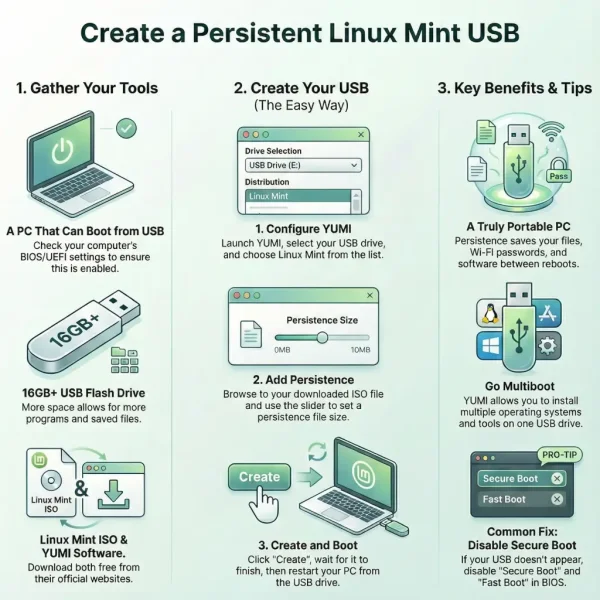
The easiest way to create a persistent Linux Mint USB is by using YUMI. Unlike standard ISO writing tools that simply create a live bootable USB, YUMI can automatically create persistence storage so your changes survive reboots.
Quick Answer
Linux Mint can be run from a persistent USB drive that saves files, settings, installed applications, and system changes between reboots. The easiest way to create a persistent Linux Mint USB is by using YUMI and selecting a persistence file size during setup.
Run Linux Mint from a USB with Persistence
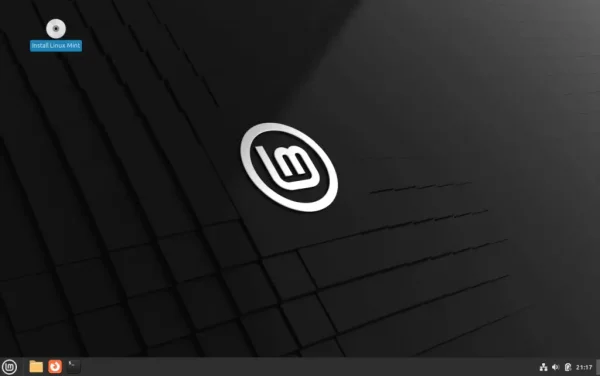
Linux Mint is a popular Linux desktop operating system based on Ubuntu. It provides a familiar desktop experience, excellent hardware support, and access to thousands of free applications.
Features
- Cinnamon: The flagship desktop with a familiar Windows-like interface.
- MATE: Lightweight and traditional desktop environment.
- XFCE: Fast and efficient desktop for older hardware.
- Software Manager: Easy software installation and management.
- Update Manager: Simple system updates and maintenance.
- Driver Manager: Helps install proprietary drivers.
- Ubuntu Compatibility: Access to Ubuntu repositories and software.
Specifications
- Project Page: linuxmint.com
- Developer: Clement Lefebvre and the Linux Mint Team
- Initial Release: 2006
- Persistence Support: Yes
- Download: Official ISO Downloads
What You'll Need
- A computer capable of booting from USB
- Windows 11, 10, 8, or 7
- A USB flash drive (16GB or larger recommended)
- A Linux Mint ISO file
- YUMI Multiboot USB Creator
Verify Your Linux Mint ISO (Recommended)
After downloading Linux Mint, you can verify the integrity of the ISO by checking its SHA256 checksum:
sha256sum linuxmint.isoCompare the resulting hash with the checksum listed on the Linux Mint verification page.
How to Create a Persistent Linux Mint USB
Method 1: Using YUMI (Recommended)
- Download and launch YUMI.
- Select your USB flash drive.
- Choose Linux Mint from the distribution list.
- Browse to your downloaded Linux Mint ISO.
- Select a persistence file size.
- Click Create.
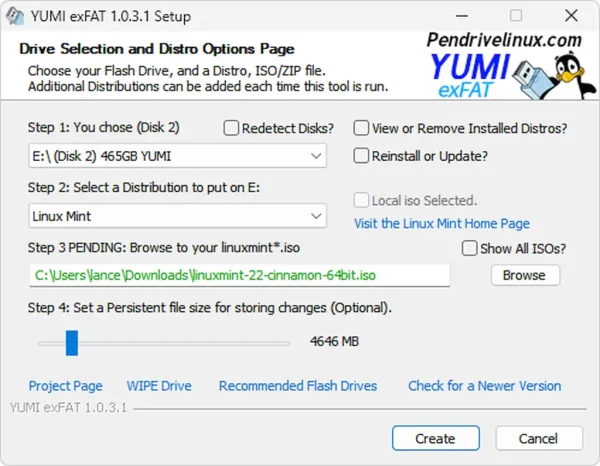
- When the process completes:
- Restart your computer.
- Boot from the USB drive.
- Select Linux Mint from the YUMI boot menu.
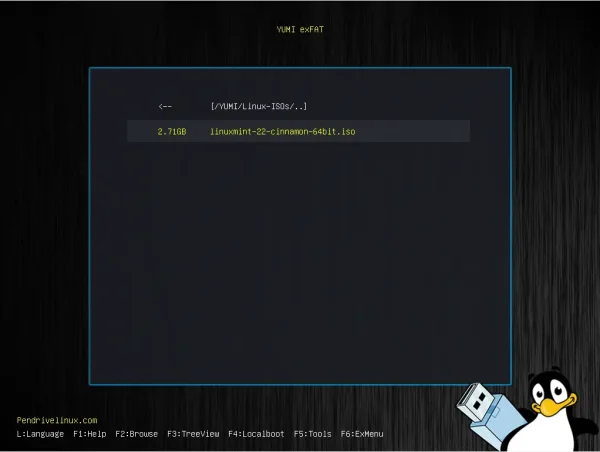
Tip: YUMI can store multiple Linux distributions, antivirus tools, recovery utilities, and even Windows installers on the same USB drive.
Method 2: Create a Standard Linux Mint Live USB with DD
If you prefer command-line tools, you can write the Linux Mint ISO directly to a USB drive using DD. This method creates a standard bootable Linux Mint Live USB but does not automatically provide persistence storage.
Using DD on Linux
- Identify your USB device:
lsblkLocate your USB drive (for example
/dev/sdX). - Write the Linux Mint ISO:
sudo dd if=linuxmint.iso of=/dev/sdX bs=4M status=progress oflag=syncReplace
/dev/sdXwith your USB device. - Wait for the process to complete. The terminal will display progress while the ISO is being written.
- Eject the drive:
sudo eject /dev/sdX
Using DD for Windows
This method performs a raw write of the Linux Mint ISO directly to a USB device and is intended for advanced users.
Warning: This process will completely erase all data and partitions on the selected USB drive.
- Download DD for Windows.
- Insert your USB flash drive.
- Open Command Prompt as Administrator.
- Identify the USB disk number using DiskPart:
diskpart
list disk
Note the disk number assigned to your USB drive, then type:
exit - Navigate to the DD directory:
cd C:\path\to\dd - Write the Linux Mint ISO to the USB drive:
dd if=C:\path\to\linuxmint.iso of=\\.\PhysicalDriveX bs=4M --progressReplace
Xwith your USB disk number. - Wait for the write operation to finish, then safely eject the drive.
Important: DD creates a standard Linux Mint Live USB. Persistence storage is not automatically configured when using DD. If you want a persistent Linux Mint USB that can save files, settings, and installed applications between reboots, use the YUMI method described above.
Troubleshooting USB Boot Issues
- USB not appearing in the boot menu? Disable Secure Boot and Fast Boot in BIOS/UEFI settings.
- Linux Mint won't boot? Verify the ISO checksum and recreate the USB drive.
- Persistence isn't working? Ensure you selected a persistence file size when creating the USB with YUMI.
- Changes aren't being saved? Confirm you booted the Linux Mint entry configured with persistence support.
Installing Linux Mint from USB
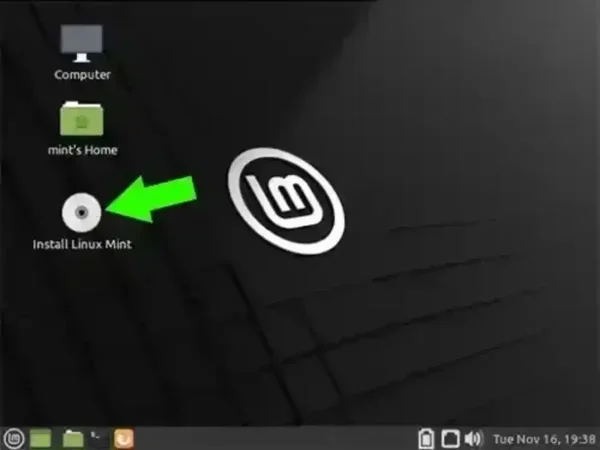
Once Linux Mint has booted from USB, double-click the Install Linux Mint icon on the desktop. Follow the installation prompts to install Linux Mint to your internal hard drive or another storage device.
Security Tip for Persistent USBs
Because persistence stores personal files and settings, treat your USB drive like a portable computer. Consider encrypting sensitive files or using full-disk encryption for additional protection.
Frequently Asked Questions
Can Linux Mint run entirely from a USB drive?
Yes. A persistent Linux Mint USB can save files, settings, installed software, and system changes directly on the USB drive, allowing you to use Linux Mint without installing it to a hard drive.
How do I install Linux Mint from a USB with persistence?
Boot into Linux Mint from the USB, then click the "Install Linux Mint" desktop icon. Follow the prompts to install Linux Mint to your internal drive or another storage device.
Which tool is best for creating a persistent Linux Mint USB?
YUMI is one of the easiest tools for creating a persistent Linux Mint USB because it supports persistence setup during USB creation.
What data does persistence save?
Persistence stores downloaded files, browser bookmarks, Wi-Fi settings, installed applications, and many other system changes between reboots.
Can I update Linux Mint on a persistent USB?
Yes. You can install software updates and save changes. However, major version upgrades are generally not recommended on a live persistent environment.
What size USB drive should I use?
A 16GB USB drive is the minimum recommended. A 32GB or larger drive provides more room for persistence storage and applications.
Can I use Rufus or Ventoy instead?
YUMI provides built-in persistence support for Linux Mint. Other tools may require additional manual configuration or have different persistence limitations.
Is persistence safe for USB drives?
Yes, although repeated writes will eventually wear flash memory over time. Using a high-quality USB flash drive or USB SSD can improve longevity.
Final Thoughts on Creating a Linux Mint USB
Creating a Linux Mint bootable USB with persistence gives you a portable Linux environment that can travel anywhere with you. Whether you're testing Linux, performing system recovery, or carrying a personalized workspace, a persistent Linux Mint USB offers flexibility without modifying your primary operating system.
Using YUMI makes the process simple while providing reliable persistence support and multiboot functionality.
