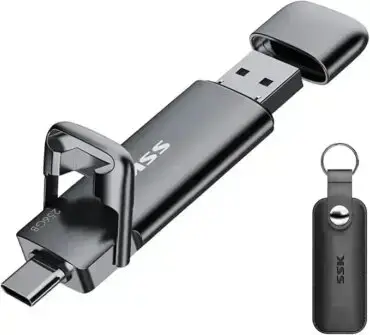
The fastest USB flash drives in 2026 are SSD based models using the USB 3.2 Gen 2 interface, delivering transfer speeds up to 1,000 MB/s, dramatically outperforming traditional USB thumb drives. My best choice top picks are the SSK Dual USB-C/A SSD (best overall), SanDisk Extreme PRO Dual Drive (most reliable), Vansuny USB 3.2 SSD (best value), and the MOVE SPEED USB SSD (Wild Edition), a dual-port SSD flash drive with metal construction and up to 1000MB/s rated performance.
Looking for a fast USB flash drive? Whether you're creating bootable USB drives, editing 4K video, streaming music from USB, running virtual machines, or simply moving huge files between devices, choosing the right drive can save time and improve everyday performance. In this guide, I'll compare the fastest SSD based USB flash drives available today, explain what separates them from traditional thumb drives, and help you choose the best model for your needs.

Quick Summary of the Fastest USB Flash Drives
These high performance USB SSD flash drives combine blazing fast transfer speeds, excellent endurance, and broad compatibility across Windows, Linux, macOS, smartphones, tablets, and gaming consoles. Whether you're creating a bootable USB drive, transferring huge video projects, or carrying your operating system in your pocket, these are my current top recommendations.
- 🏆 SSK Dual USB-C/A SSD: Best overall combination of speed, value, portability, and compatibility with up to 1000MB/s transfers.
- 🎯 SanDisk Extreme PRO Dual Drive: Premium dual connector SSD flash drive featuring excellent reliability and optional password protection.
- 💰 Vansuny USB 3.2 SSD Flash Drive: Best value for speed, delivering up to 1000MB/s transfers at one of the lowest prices in its class.
- 🆕 MOVE SPEED USB SSD (Wild Edition): A dual-port SSD flash drive with a metal shell, a push-button slider that swaps between exposed USB-A and USB-C connectors, and up to 1000MB/s rated performance.
My Background with USB Flash Drives
Over the past 20+ years, I've tested hundreds of USB flash drives, from department store bought inexpensive thumb drives and memory sticks to manufacturer direct premium SSD based USB storage devices. Some have proven incredibly fast and dependable, while others failed after only moderate use, especially when repeatedly written to as bootable operating system drives.
Much of my testing revolves around creating multiboot USB drives using tools such as YUMI and Universal USB Installer, installing portable Windows environments, running Linux Live distributions, cloning drives, and performing sustained file transfers. Those real world workloads quickly separate quality SSD flash drives from slower traditional USB sticks.
This guide combines my own hands on experience with manufacturer specifications to help you choose a drive that's both fast and reliable, without breaking the bank. There are faster SSD flash drives out there - some push well past 1000MB/s - but they often cost two or three times as much for a jump in real-world speed most people will never notice outside of a benchmark chart. Everything below is picked for hitting the sweet spot between genuine SSD class performance and a price that doesn't sting.
Why USB Drive Speed Matters
A high speed USB SSD saves more than just time. Whether you're running Windows or Linux directly from USB, editing 4K or 8K video, playing back mp3 music, transferring hundreds of gigabytes between systems, creating multiboot rescue drives, or launching virtual machines from portable storage, an SSD based fast USB flash drive dramatically outperforms a traditional USB memory stick:
- Much faster transfers: Copy huge files in seconds instead of minutes.
- Better boot performance: Faster random read speeds make portable operating systems feel far more responsive.
- Improved endurance: Better controllers, wear leveling, and higher quality NAND generally provide a much longer service life.
- Professional workflows: Edit photos and videos directly from the drive without constantly copying files to local storage.
- Broad compatibility: Modern dual USB-C/A designs work across desktops, laptops, tablets, smartphones, and many gaming consoles.
Disclosure: This post contains affiliate links. As an Amazon Associate, this site may earn from qualifying purchases at no additional cost to you. Purchases made via these links can help fund future development.
Top 4 Fastest USB Flash Drives in 2026
#1 SSK Dual USB-C/A SSD Flash Drive
The SSK Dual USB-C/A SSD Flash Drive earns my top recommendation. While it isn't the cheapest drive on this list, it consistently strikes the best balance of speed, build quality, and cross-platform compatibility. Rated for up to 1000MB/s read and write, it uses both USB-A and USB-C connectors, so it works equally well on modern laptops, desktop PCs, tablets, smartphones, and even many gaming devices.
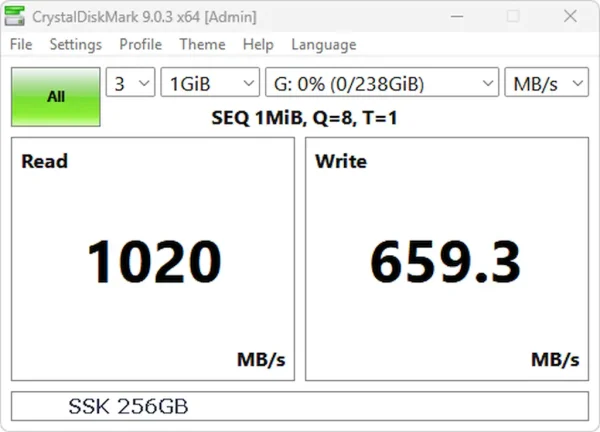
Unlike many inexpensive USB flash drives, the SSK is built around SSD technology rather than a simple flash controller, which shows up in sustained performance during large file transfers. It's a solid pick for creating bootable operating systems, running Linux Live USB environments, carrying portable applications, or storing large video libraries. Of every drive I've personally benchmarked so far, it currently posts the fastest sequential numbers on my test bench.
One caveat: hitting the full advertised transfer rate requires a USB 3.2 Gen 2 port. Plug it into an older USB 3.0 or USB 3.1 Gen 1 port and the interface - not the drive - becomes the bottleneck.
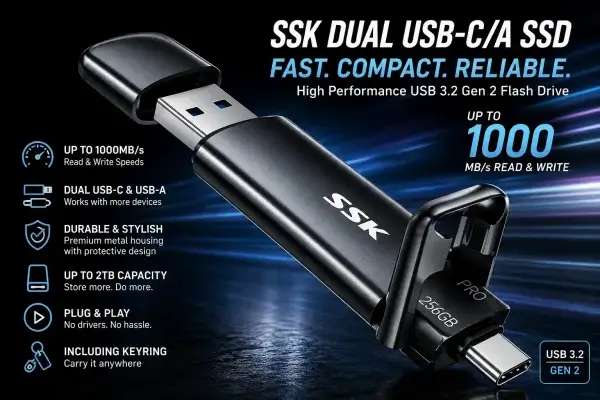
Highlights:
- Up to 1000MB/s manufacturer rated read/write performance
- USB-C and USB-A connectors built into one drive
- Solid zinc alloy enclosure
- Strong value against competing SSD flash drives
- Well suited to portable operating systems and large file transfers
SSK Dual USB-C/A SSD Benchmark Test
#2 SanDisk Extreme PRO Dual Drive
The SanDisk Extreme PRO Dual Drive is one of the most refined SSD style USB flash drives available. Rated at up to 1000MB/s read and 900MB/s write, it pairs strong performance with SanDisk's long track record for build quality and firmware stability.
Its integrated USB-C and USB-A connectors make moving files between desktops, laptops, smartphones, and tablets effortless, without needing an adapter. SanDisk also includes optional 128-bit AES password protection, which makes it a sensible pick if you're carrying sensitive personal or business data.
It costs a bit more than some competitors, but the construction and dependable firmware make it one of the safer long-term bets for anyone who needs high speed portable storage they can trust for years, not just months.
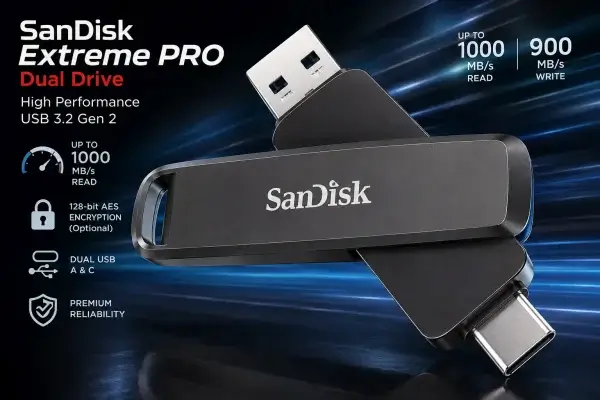
Highlights:
- Up to 1000MB/s read and 900MB/s write speeds
- Established SanDisk reliability
- Dual USB-C and USB-A connectors
- Optional password protection with 128-bit AES encryption
- Broad compatibility across modern devices
#3 Vansuny USB 3.2 SSD Flash Drive
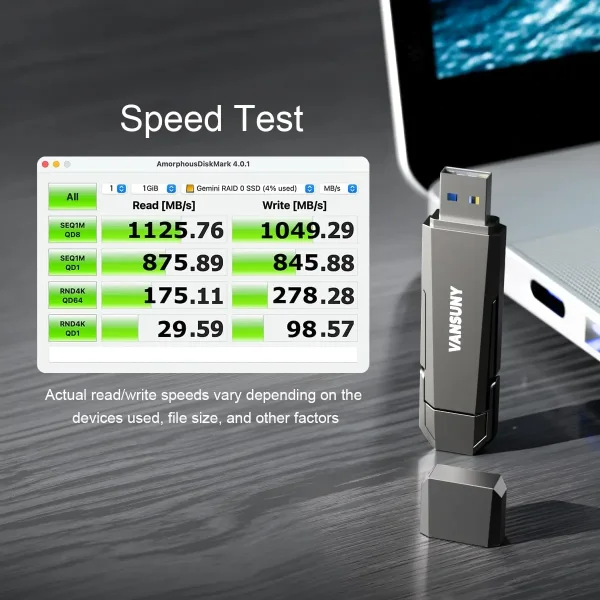
The Vansuny USB 3.2 SSD Flash Drive is one of the newer entries in this category, and it undercuts the competition on price without giving up much on paper. Rated for up to 1000MB/s read and write, it offers both USB-C and USB-A connectors, so moving files between laptops, desktops, tablets, and phones doesn't require carrying adapters around.
It's built on SSD technology and a USB 3.2 Gen 2 interface rather than a basic flash controller, which lets it sustain higher transfer rates during large backups and media transfers. The aluminum alloy housing helps dissipate heat during extended workloads while staying compact enough for everyday carry.
Available in capacities up to 2TB, it's a good fit for virtual machines, bootable operating systems, photo libraries, large software collections, or editing video directly from the drive. Its advertised numbers are nearly identical to drives costing noticeably more - which is exactly why it earns the value pick.
Highlights:
- Up to 1000MB/s manufacturer rated read/write speeds
- USB 3.2 Gen 2 interface
- Dual USB-C and USB-A connectors
- Durable aluminum alloy enclosure
- Available in capacities up to 2TB
- Well suited to large backups, media storage, and portable operating systems
#4 MOVE SPEED USB SSD (Wild Edition)
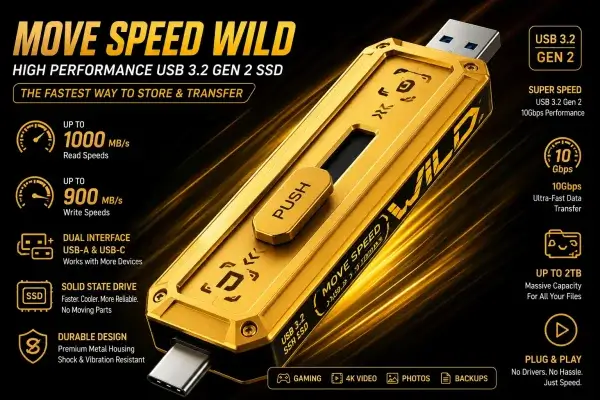
The MOVE SPEED USB SSD (Wild Edition) is the newest drive on this list. It's a USB 3.2 Gen 2 SSD flash drive with dual USB-A and USB-C connectors, a metal shell, and a manufacturer rating of up to 1000MB/s. The standout feature is a push-button slider on the body: slide it one way and the USB-A connector extends, slide it the other and it retracts to expose the USB-C connector instead - both connector types, no dongle or second cable required.
It's built on portable SSD architecture rather than a basic flash controller, with thermal management designed for sustained transfers, which matters more than the headline number once you're moving large files for extended periods.
It's also available in large capacities, which combined with its industrial styling and dual-connector design makes it an interesting option if you want a modern, high-capacity SSD flash drive built to hold up under sustained use.
Highlights:
- Up to 1000MB/s rated read/write performance
- USB 3.2 Gen 2 interface
- Dual USB-A and USB-C connectors
- Metal construction with a push-button slider that switches between USB-A and USB-C connectors
- Portable SSD architecture designed for sustained transfers
- Available in large capacities
USB SSD Flash Drives vs. Traditional Thumb Drives
Before diving into buying advice, it helps to understand why "SSD flash drive" and "USB thumb drive" aren't really the same category of product, even though they plug into the same port.
Why SSD Flash Drives Are Different
A traditional USB thumb drive is usually built around a single inexpensive flash controller designed for occasional, light-duty file storage. An SSD based USB flash drive uses the same fundamental building blocks found in internal and external SSDs: a more capable controller, a DRAM or SLC cache, and NAND flash managed with proper wear leveling, stronger error correction (ECC), and better bad block management. Those technologies distribute writes more evenly across the memory and extend the drive's usable life - endurance is often measured in TBW (Terabytes Written) and P/E (Program/Erase) cycles, both substantially higher on quality SSD storage than on inexpensive USB thumb drives.
After nearly two decades of working with bootable USB media, I've found SSD flash drives hold up far better under demanding workloads such as running Linux Live systems, portable Windows installations, virtual machines, daily software development, frequent backup and restore operations, and large media transfers. I still own several SSD flash drives purchased over five years ago that continue to perform flawlessly despite thousands of gigabytes written. Many inexpensive flash drives, by comparison, start showing performance degradation or outright failure after prolonged heavy write activity.
Pro Tip: Regardless of the drive you choose, maintaining regular backups remains the best protection against unexpected hardware failure.
Sequential vs. Random Performance
Manufacturers advertise sequential speeds because they're the biggest, most flattering numbers a drive can produce. Sequential performance measures large, contiguous file transfers, like copying one big ISO or video file. Random performance measures small, scattered read and write operations, which is what happens constantly when an operating system is running. A drive can post outstanding sequential numbers and still feel sluggish in random-heavy workloads if its controller isn't built for it.
Why Booting Linux Differs From Copying a Movie
Copying a movie file is about as easy as storage workloads get: one large file, written once, read sequentially. Booting a Linux Live USB is the opposite. The bootloader and OS are constantly opening, reading, and sometimes writing thousands of small files scattered across the drive in no particular order - a random I/O workload, not a sequential one. A drive's advertised sequential speed simply doesn't tell you much about how snappy it will actually feel as a bootable Linux or Windows To Go drive.
USB Attached SCSI Protocol (UASP)
UASP is a protocol that lets a USB drive handle multiple read/write commands in parallel instead of processing them one at a time, the way the older Bulk-Only Transport (BOT) protocol does. Support for it gives SSD based flash drives a meaningful boost in random performance and lower latency - in practice, a more responsive experience when running an operating system or multitasking with lots of small files.
Thermals
Sustained transfers generate heat, and heat is the enemy of sustained speed. Once an SSD controller gets hot enough, it throttles itself to protect the NAND and electronics, and your transfer speed drops accordingly. Enclosure material matters a great deal here: metal housings dissipate heat far more effectively than plastic, which is a big part of why premium SSD flash drives lean toward zinc or aluminum alloy shells instead of bare plastic.
Why Advertised Speeds Don't Match Real-World Speeds
"Up to" is doing a lot of work on most retail packaging. Advertised speeds are best-case sequential numbers, measured under ideal lab conditions with a specific test tool, file size, and host controller. Real world results usually come down to two things breaking that lab scenario:
- Controller and cache: Almost every USB SSD flash drive uses a fast cache, usually SLC-mode NAND or DRAM, to post impressive numbers in short benchmark runs. The real test comes once that cache fills up during a large, continuous transfer - a well-engineered drive degrades gracefully, while a weak controller can fall off a cliff.
- The host side of the connection: Even an excellent SSD flash drive can be bottlenecked by an older USB 3.0 or USB 3.1 Gen 1 port, a cheap USB hub, or an aging motherboard controller. If a drive isn't hitting its advertised numbers, the bottleneck is often on the computer's side of the cable, not the drive's.
That's exactly why I keep manufacturer specifications separate from my own benchmark results throughout this guide instead of blending the two together.
File System Choice and Multiboot Performance
Formatting affects more than compatibility. It can also influence real world performance when using tools like YUMI, YUMI Py, or Universal USB Installer.
- exFAT - Best cross platform compatibility (Windows, macOS, and Linux), no practical file size limit, and minimal overhead. Recommended for most multiboot USB drives.
- NTFS - Full Windows feature support, including permissions and journaling, but Linux and macOS require additional support and may incur extra overhead.
- EXT4 - Best suited for Linux focused workflows. Journaling improves resilience after crashes, but Windows cannot read it natively.
For most YUMI created multiboot USB drives, exFAT remains the best overall choice unless you specifically need NTFS features or plan to use the drive primarily with Linux.
How I Benchmark USB Flash Drives
My recommendations are based on a combination of hands on testing and long term real world use. Whenever possible, I benchmark each USB flash drive using CrystalDiskMark on a modern Windows system connected to a native USB 3.2 port, running multiple passes to measure both sequential and random read/write performance, then comparing those results against the manufacturer's published specifications.
Benchmarks are only part of the story. I also evaluate how each drive performs during the tasks I use every day: creating multiboot USB drives with YUMI, booting Windows and Linux directly from USB, copying large ISO images, launching portable applications, and running sustained file transfers. Those real world workloads often reveal differences that synthetic benchmarks alone can't show.
Not every drive here has been personally benchmarked yet. Where my own test results are available, I've included them alongside the manufacturer's specifications and labeled which is which. As I test additional models, including the MOVE SPEED, I'll update this guide and revise the rankings whenever warranted.
Read & Write Speed Comparison
| Drive Model | Interface | Peak Read / Write* | Connector | Construction |
|---|---|---|---|---|
| SSK Dual USB-C/A SSD | USB 3.2 Gen 2 | 1000 MB/s / 1000 MB/s | USB-C / USB-A | Zinc Alloy |
| SanDisk Extreme PRO Dual Drive | USB 3.2 Gen 2 | 1000 MB/s / 900 MB/s | USB-C / USB-A | Premium Metal |
| Vansuny USB 3.2 SSD | USB 3.2 Gen 2 | 1000 MB/s / 1000 MB/s | USB-C / USB-A | Aluminum Alloy |
| MOVE SPEED (Wild Edition) | USB 3.2 Gen 2 | Up to 1000 MB/s | USB-C / USB-A | Metal Housing |
*Manufacturer rated speeds. Actual transfer rates vary depending on USB controller, host hardware, file sizes, operating system, and workload.
Choosing the Best USB Flash Drive for Your Use Case
Rather than buying on advertised transfer speed alone, weigh these factors:
- Speed: Drives capable of at least 500MB/s provide a dramatic improvement over traditional USB flash drives. USB 3.2 Gen 2 SSD models can often approach or exceed 1000MB/s.
- Durability: Metal housings and SSD based designs generally withstand heavy use much better than inexpensive plastic flash drives.
- Connector Type: Dual USB-C/A drives give you the most flexibility across desktops, laptops, tablets, and smartphones.
- Capacity: Operating systems, virtual machines, and modern games consume storage quickly. Consider 512GB or larger if you routinely work with large files.
- Random Performance: If you plan to boot Windows or Linux directly from the drive, random read and write speeds matter more than sequential benchmarks.
Here's how I'd match each drive to a use case:
| Use Case | Best Pick | Why? |
|---|---|---|
| Best Overall | 🏆 SSK Dual USB-C/A SSD | Outstanding combination of speed, affordability, portability, and compatibility. |
| Premium Build & Warranty | 🛡 SanDisk Extreme PRO Dual Drive | Metal enclosure, optional encryption, and a lifetime limited warranty; this is not a claim of independently verified failure-rate superiority. |
| Best Value for Speed | 💰 Vansuny USB 3.2 SSD | Delivers 1000MB/s-class performance at one of the lowest prices in this category. |
| Best Innovation | 🆕 MOVE SPEED (Wild Edition) | Metal construction, and a fun innovative design. Dual port compatibility between different systems. Manufacturer also offers other drives with on device digital display to track transfer speed, and monitor storage. |
Compatibility Across Systems & Devices
- Windows & Linux: Most drives work immediately when formatted as NTFS or exFAT.
- macOS: exFAT provides excellent cross platform compatibility, while APFS is recommended for Apple-only environments.
- Android Tablets & Phones: USB-C equipped devices can usually access dual connector SSD flash drives without adapters.
- Gaming Consoles: Many USB SSD flash drives work well with PlayStation and Xbox consoles for media storage and compatible game installations.
- Portable Applications: Fast SSD flash drives dramatically reduce launch times for portable software suites and development environments.
Pro Tip: If you regularly move data between Windows, macOS, and Linux, formatting the drive as exFAT provides the broadest compatibility.

SSD Flash Drive FAQs
Can I boot Windows or Linux from an SSD flash drive?
Absolutely. SSD flash drives are ideal for portable Windows installations, Linux Live systems, recovery environments, and multiboot USB drives because of their superior random read performance and faster boot times.
Do I need USB 3.2 Gen 2 to achieve full speed?
Yes. To reach transfer rates approaching 1000MB/s, both the drive and your computer must support USB 3.2 Gen 2. Older USB ports remain compatible but will reduce maximum performance.
Is USB-C faster than USB-A?
Not necessarily. The connector itself doesn't determine speed. Performance depends on the USB specification supported by both the drive and the host device. USB-C simply offers greater convenience and compatibility with newer hardware.
Which USB flash drive is best for creating bootable USB drives?
For my own bootable USB projects using YUMI, YUMI Py, and Universal USB Installer, I've had excellent results with the SSK Dual USB-C/A SSD, which currently posts my fastest personally benchmarked numbers. The SanDisk Extreme PRO and Vansuny USB 3.2 SSD are both strong alternatives as well.
Is the MOVE SPEED (Wild Edition) worth buying?
Yes, especially if you want a modern dual-port SSD flash drive with metal construction, a push-button slider that switches between USB-A and USB-C connectors, and large capacity options. Its USB 3.2 Gen 2 interface and up to 1000MB/s rating put it in the same performance class as the other drives on this list.
Will an SSD flash drive wear out faster if I use it for a bootable OS?
Not necessarily. Flash-drive lifespan depends on the NAND, controller, write workload, thermal conditions, and the manufacturer's endurance specifications. Some SSD-based USB drives may have stronger controllers and wear leveling than inexpensive thumb drives, but that does not guarantee longer life for every model. Running an operating system can generate frequent writes, so keep backups and check the drive's warranty and endurance information where available.
Final Verdict: Fastest Thumb Drives for 2026
The days when every USB flash drive delivered roughly the same performance are long gone. Modern SSD based USB drives now rival many external SSDs, making them solid choices for everything from portable operating systems to professional content creation.
The SSK Dual USB-C/A SSD is my top recommendation and the fastest drive on my own test bench right now. If long term dependability matters more to you than shaving off a few dollars, the SanDisk Extreme PRO Dual Drive continues to justify its price with quality construction and optional hardware encryption. If you want 1000MB/s-class performance without the premium price tag, the Vansuny USB 3.2 SSD is the easiest recommendation on this list. And if you like the idea of a metal-bodied, high-capacity drive with a clever slider mechanism, the MOVE SPEED (Wild Edition) is worth a look.
Whichever you pick, any of these four will be a substantial upgrade over a traditional off-the-shelf USB memory stick - especially if you're creating multiboot USB drives with YUMI, carrying a portable operating system, or editing video directly from removable storage.