
How to Install Gentoo on USB: The following simple guide explains how to create a Gentoo Live bootable USB flash drive using Windows, a Gentoo Live ISO file, and the Universal USB Installer tool, or dd. By the end of this tutorial, you'll have a portable version of Gentoo Linux that you can boot directly from a USB drive.
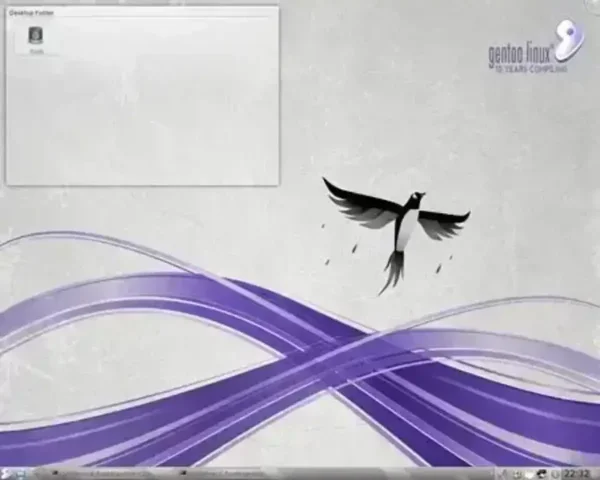
Gentoo Live Running from a Bootable USB
A Brief History of Gentoo Linux
Gentoo Linux was first conceptualized and created by Daniel Robbins in 2002. Initially, it began as a project called Enoch Linux, which sought to provide a highly customizable and source based Linux distribution. Robbins envisioned a distribution that would give users full control over their system's software, including its compilation and optimization settings.
Inspired by the BSD ports system, Robbins developed the Portage package management system, a groundbreaking feature of Gentoo that allows users to automate the downloading, configuring, compiling, and installing of software. This innovation was instrumental in Gentoo's success and appeal to advanced Linux users.
After renaming the project to Gentoo (a nod to the fast swimming Gentoo Penguin), the distribution quickly gained popularity in the Linux community for its performance optimization and extreme customizability. While Robbins eventually stepped away from Gentoo's leadership, the distribution has continued to thrive under a dedicated community of developers and users. Today, Gentoo is recognized as a pioneer in source-based Linux distributions and remains a popular choice for those who value control and flexibility in their operating system.
What is Gentoo Linux?
In Summary, Gentoo Linux is a highly customizable Linux distribution popular among advanced users who value flexibility and performance. Named after the fast-swimming Gentoo Penguin, this source-based distribution enables users to compile software directly on their hardware for maximum efficiency.
Key Features of Gentoo Linux
- Portage Package Management: A powerful system for downloading, configuring, compiling, and installing software with full user control over the process.
- USE Flags: Customize package features during installation to suit your exact needs.
- Rolling Release Model: Always stay up to date with the latest software without needing to reinstall your OS.
- Hardware Optimization: Compile software specifically for your hardware, ensuring peak performance.
While Gentoo is powerful, it is best suited for users familiar with Linux and manual configuration processes, as the distribution requires significant setup and tuning compared to others like Ubuntu or Fedora.
Why Choose Gentoo Linux?
Gentoo Linux provides unparalleled control over your Linux environment. With a Gentoo bootable USB setup, you gain the added advantage of portability, making it ideal for Linux enthusiasts or IT professionals who need a reliable portable live operating system to use at any computer, while on the go.
Ready to try it out? Simply follow this guide to create your Gentoo bootable USB stick and experience the power and flexibility of Gentoo Linux today!
Why Run Gentoo on USB?
Running Gentoo from a USB offers portability and convenience. It allows you to carry a customized, bootable Linux environment wherever you go. Whether you're troubleshooting systems, working on multiple devices, or simply exploring Gentoo Linux Live, having it on a USB stick ensures flexibility.
Gentoo Bootable USB Creation Essentials
Before you begin, you'll need the following:
- A Windows computer to run UUI or Linux running WINE.
- A USB drive with a minimum capacity of 4 GB.
- The Gentoo Live ISO file (LiveGUI USB Image)
- The Universal USB Installer, a free tool for creating Multiboot bootable USB drives.
How to Create a Bootable Gentoo USB using UUI
Follow these steps to set up your Gentoo bootable USB stick:
Note: This setup creates a live environment. Persistent storage for Gentoo on USB, which retains changes across reboots, is not covered in this tutorial.
- Download and install the Universal USB Installer on your Windows system.
- Run the Universal USB Installer (UUI) program as an administrator.
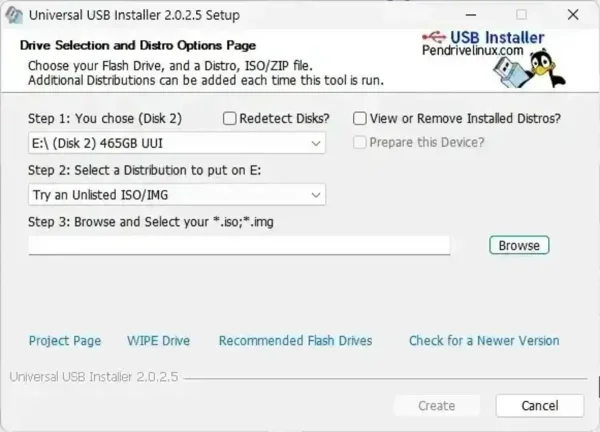
- Select your USB from the drop list, and check the box to prepare the device.
- Select "Try an Unlisted ISO/IMG" from the list of distributions.
- Browse to your downloaded Gentoo Live ISO file LiveGUI USB Image.
- Click "Create" to write the ISO file to your USB drive.
- Once completed, restart your computer and access the BIOS or Boot Menu. Change the boot order to prioritize your USB drive.
- Save the changes and reboot. If successful, your system should boot directly into Gentoo Linux.
Using DD to Make a Bootable Gentoo USB
If you prefer a straightforward method to create a Gentoo bootable USB without additional tools, you can use the dd command. This method involves writing the Gentoo Live ISO directly to your USB drive using a Windows command-line utility. It is simple and efficient but requires caution, as it can overwrite data on the selected drive.
What is dd? The dd command is a powerful disk copying tool commonly used in Unix-like operating systems. In Windows, this functionality can be accessed using third-party tools that mimic the behavior of dd, such as Win32 Disk Imager or dd for Windows. This method provides direct, low-level writing of the ISO file to your USB drive, creating a bootable device.
Prerequisites for putting Gentoo on USB with dd
- Gentoo Live DVD ISO: Download the latest ISO file
- A USB drive: Ensure it has a minimum of 4 GB of space and contains no important data, as it will be overwritten.
- dd for Windows: Alternately you could use a GUI tool like Win32 Disk Imager.
How to Create a Gentoo Bootable USB Using dd
Important: Double check the USB drive letter before running the dd command. Incorrectly specifying the drive letter could result in data loss on another drive. The dd command will overwrite the entire USB drive. Ensure the drive does not contain important data. The process may take several minutes, depending on the speed of your USB drive and the size of the ISO.
In most cases, dd can successfully write a Gentoo Live ISO to a USB drive from Windows if the device is first wiped using diskpart. When the USB disk is left in a raw, uninitialized state, Windows briefly avoids interfering with it, giving dd a short window to write the image directly.
- Download dd for Windows.
- Insert your USB flash drive into the system.
- Launch an elevated Command Prompt
Press Win + R, typecmd, then press Ctrl + Shift + Enter to run it as administrator. - Navigate to the dd executable
Change to the directory containingdd.exe:cd C:\path-to-dd - Reset the USB device using diskpart
Start the Windows disk partition utility:diskpartList all attached disks:
list diskSelect the USB drive by its disk number:
select disk #Remove all existing partition and filesystem data:
cleanExit diskpart:
exit - Write the Gentoo Live ISO to the USB device
Immediately after exitingdiskpart, write the ISO image. Replacepath-to-gentoo-live.isowith the correct path to ISO filename andXwith your USB disk number.dd if=path-to-gentoo-live.iso of=\\.\PhysicalDriveX bs=4M --progress
Things to keep in mind:
- The Command Prompt must remain open and elevated
- Do not open Disk Management after running
clean - Do not format or access the USB drive during the write process
- The USB device may appear unreadable in File Explorer, which is normal
Once the write completes, safely eject the USB drive using Windows Safely Remove Hardware. Reboot the system, select the USB device from the BIOS or UEFI boot menu, and the Gentoo Live environment should start.
Advantages of Using dd
- Simplicity: No need for third-party GUI tools.
- Direct Write: The ISO is written directly to the USB, reducing the chances of errors.
Gentoo Bootable USB Troubleshooting
Here are some troubleshooting tips that might help if you can't seem to get your Gentoo bootable USB drive to boot:
USB not detected?
Ensure your BIOS supports USB booting and that the drive is properly formatted.
Boot errors?
Verify the ISO file's integrity and re-create the bootable USB stick if necessary.
Slow performance?
Consider using a high-speed USB 3.0 drive for better results.
Additional Gentoo Linux Resources
For additional help and more information regarding Live Linux distribution, you can refer to these helpful resources:
Gentoo Handbook - Official guide for installing and managing Gentoo.
Gentoo Forums - Community discussions and troubleshooting tips.
Gentoo Wiki - A rich resource for advanced configurations and setups.
That's all there is to creating a Gentoo Bootable USB stick. Enjoy!
