
How to Make a Portable SLAX bootable USB drive: Running Linux from a flash drive gives you portability, flexibility, and a practical way to test or troubleshoot computers without affecting your primary system. In this walkthrough, you'll learn how to set up a SLAX live USB using YUMI Multiboot USB Creator on Windows, or on Linux via WINE. Methods are also provided to help do the same natively from Linux or a macOS.
Portable SLAX Bootable USB Drive

What is SLAX Linux?
SLAX is a lightweight, modular Linux operating system based on Slackware. It's designed for speed, minimal resource usage, and can run entirely from removable media. With support for persistent storage, it is ideal for tech enthusiasts, privacy focused users, or anyone needing a tiny portable Linux OS.
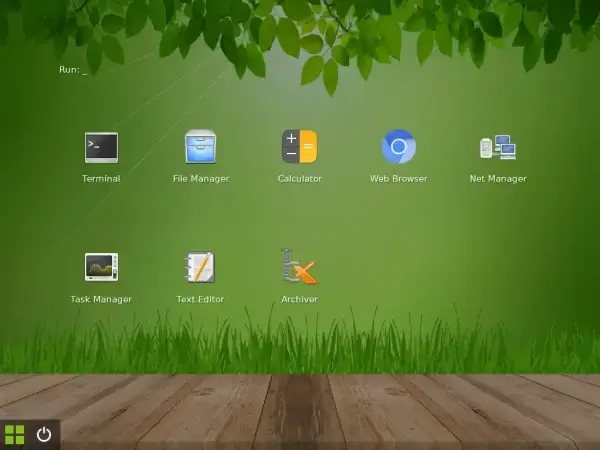
Key Specifications
- Homepage: slax.org
- Developer: Tomas Matejicek
- Minimum Flash Drive Size: 256 MB
- Persistence: Yes, data and changes can be saved
- Initial Release: 2003
Benefits of Running a Portable SLAX from USB
- Compact: Ideal for low powered or older hardware
- Portable: Carry your Linux environment with you
- Modular Design: Add or remove system components as needed
- Persistent Storage: Save data and settings between sessions
- Perfect for: Learning Linux, data recovery, private browsing, or mobile work
What You Need to Get Started
Before you create the USB, gather the following:
- A USB flash drive (fast SSD based flash drive with higher speed is preferred)
- The latest SLAX ISO
- YUMI USB Creator or use the dd or cp commands from Linux or macOS
- A Windows, Linux or MacOS PC or a Linux system running WINE
Provided below are methods for creating a SLAX bootable USB drive from Windows, Linux and macOS:
How to Make a SLAX Bootable USB using YUMI
Here's how you can use YUMI from within Windows to create a SLAX Bootable USB drive:
- Visit the YUMI page and download the tool.
- Plug in your USB device (ensure no important data is on it as it'll be wiped).
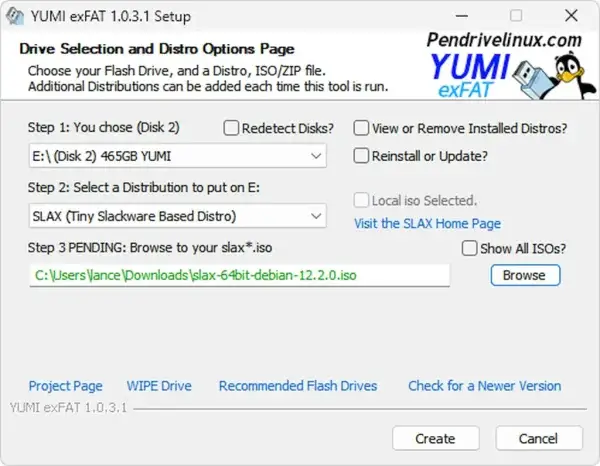
- Launch YUMI and follow these simple steps:
- Choose your USB drive from the menu. Check the box to prepare the USB.
- From the list of distros, select SLAX.
- Browse to the SLAX ISO file you downloaded earlier.
- Click Create to build the bootable drive.
Booting into the Live Environment
- Safely eject and insert the flash drive into the target computer.
- Restart and access the boot menu (e.g.
F2,DEL,ESC,F12). - Select the USB as the primary boot option.
- Save settings and continue booting.
- Choose the SLAX option from the bootloader screen.
- The live session will start from the USB.
Creating a SLAX Bootable USB on Linux or macOS
If you're not using Windows, you can still create a SLAX bootable USB using the command line. Below are steps tailored for Linux and macOS users. No special software is needed beyond the terminal and native tools like dd or cp.
Method 1: Use the Terminal (Linux/macOS)
- Insert the USB drive and determine its device name:
sudo fdisk -l # (Linux)diskutil list # (macOS)Make note of the USB's device name (e.g.
/dev/sdbor/dev/disk2). - Unmount the USB drive:
sudo umount /dev/sdX* # Replace X with your drive letter (Linux)diskutil unmountDisk /dev/diskX # macOS - Write the SLAX ISO to the USB drive using
dd:sudo dd if=/path/to/slax.iso of=/dev/sdX bs=4M status=progress && syncFor macOS, use:
sudo dd if=/path/to/slax.iso of=/dev/rdiskX bs=1m⚠️Warning: Be extremely careful with the
ddcommand, entering the wrong drive path may overwrite your main system drive. - Eject the USB safely:
sudo eject /dev/sdX # Linuxdiskutil eject /dev/diskX # macOS
Method 2: Use cp on Linux (For UEFI only SLAX ISO)
If your SLAX ISO is configured for UEFI and not BIOS/MBR boot:
sudo cp slax.iso /dev/sdXThis is a simple raw copy, and works with certain hybrid ISO files like SLAX.
Optional: Set Up Persistence (Linux Only)
SLAX may support persistence automatically when booting from USB, but if needed, you can manually create a slax directory with a changes folder on a second partition formatted as EXT4 or FAT32.
mkdir -p /media/usb/slax/changesDuring boot, SLAX will automatically detect this and use it to save changes.
Tips for Linux/macOS Users
- Use
lsblkordf -hto confirm USB mount paths - Don't mount the ISO or USB before using
dd - macOS may require you to use the raw device path (e.g.
/dev/rdisk2) for faster performance
Troubleshooting for Linux/macOS Users
- USB not bootable? Ensure the ISO supports both legacy and UEFI booting
- System won't detect USB? Try writing the ISO again, and verify Secure Boot is off
- Changes not saved? SLAX persistence must be supported and correctly configured
SLAX Persistence: Keep Your Files Between Reboots
Unlike many live Linux systems, SLAX offers native persistence:
- Data, browser history, and settings are retained after restart
- Persistence works automatically when using the default boot method
- No need for complex partitioning or setup
Extra Tips
- Use USB 3.0 drives for best performance
- YUMI lets you add other distros alongside SLAX for multiboot setups
- Place downloaded modules in
/slax/modules/to expand functionality
Popular Use Cases
- Portable OS: Use Linux on various systems without installing it
- System Recovery: Boot into SLAX to fix or access unbootable computers
- Teaching Tool: Great for classroom and training environments
- Private Sessions: Run Linux in an isolated, disposable state
Troubleshooting SLAX USB Boot Issues (FAQ)
If you're having trouble getting SLAX to boot from your USB drive, you're not alone. Here are common questions and solutions to help you troubleshoot SLAX boot issues effectively.
Why doesn't my computer detect the SLAX USB drive?
This typically happens if:
- Your system doesn't support USB booting (especially older PCs)
- The USB drive isn't formatted correctly
- The USB port used may be faulty or incompatible
Solution:
- Enter BIOS or UEFI settings and ensure that USB boot is enabled
- Reinsert the USB into a different port (preferably USB 2.0 or directly into the motherboard)
- Recreate the bootable USB and verify correct formatting
SLAX doesn't show up in the boot menu. What should I do?
If the SLAX entry is missing from your boot menu:
- Check if the USB drive was created using the correct ISO
- Make sure you selected the correct USB drive and that the ISO was successfully written
Solution:
- Recreate the SLAX USB again
- Double check that Secure Boot is disabled in BIOS/UEFI
- Try a different USB drive in case the current one has hardware issues
Missing operating system or black screen after selecting USB boot
This usually means the bootloader was not correctly installed or the ISO image was corrupted.
- Re download the ISO to ensure it's not corrupted
- Reformat the USB before trying again
- Ensure the USB drive has a Master Boot Record (MBR), not GPT (YUMI prefers MBR)
SLAX boot screen appears, but then the system freezes or reboots
This could be due to hardware compatibility issues or insufficient system resources.
- Try booting with the "safe mode" or "text mode" option if available
- Verify that your system meets SLAX's minimum requirements
- Remove or disconnect external devices that may be interfering
SLAX USB boots, but changes are not saved after reboot
This means your SLAX USB may not be running in persistent mode.
- Ensure you selected persistent storage if creating the bootable USB from YUMI
- When booting, select the SLAX Persistent or default boot option (not "fresh" or "copy to RAM")
How do I access BIOS/UEFI to change boot order?
On most systems, press one of these keys during the startup splash screen:
DELorF2for BIOSF12,ESC, orF10for one-time boot menu
Look for the "Boot Order" or "Boot Priority" setting and move your USB drive to the top of the list. Be sure to save and exit, and proceed to boot SLAX from USB.
SLAX USB still not working?
Try your SLAX USB stick on another machine. If it boots there, the issue may be specific to your PC's BIOS, hardware compatibility, or USB port.
Alternatively, test copying another Linux distribution over to rule out SLAX specific problems.
You might also want to check out all of the different SLAX boot options also known as cheat codes. These are essentially boot parameters that can be used at startup to modify how the system boots across various hardware and specific use case conditions.
To Conclude: SLAX is a Tiny Portable Linux OS made to run from USB
In summary, building a bootable SLAX USB stick provides an easy way to access a compact, fully featured Linux OS from nearly any computer. Thanks to its modular design and built in SLAX persistence, this distribution remains a top choice for portable Linux users.
Whether you're experimenting, troubleshooting, or just need a tiny portable Linux OS on the go, this SLAX bootable USB setup delivers the power in a small package.
