USB Creator Tools Category
Boot DOS from USB
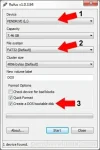
Creating a DOS Bootable USB Flash drive to "Boot DOS from USB", is not very complicated. However, a tool called Rufus, created by Pete Batard, can make this task more than simple. Rufus is similar in appearance and operation to the HP USB Format tool "HPUSBFW.exe", and shares many of the same features. However, Rufus is Open Source.
LiveUSB Install – Live USB Creator
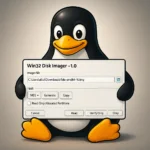
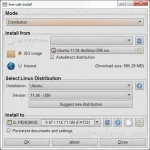
LiveUSB Install is another nice third party Live Linux USB Creation tool created by Krasimir S. Stefanov. It can be used to install a Live Linux distribution of your choice on a thumbdrive from ISO, CD/DVD, or torrent download. Other unique features include the ability to customize the syslinux.cfg file, use WinGrub, or write an IMG file to the flash drive.
XBOOT – Multiboot ISO USB Creator (Windows)
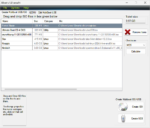
XBOOT is yet another neat little Multiboot ISO USB Creator. It is a Windows based application that can be used to create a Live Multiboot USB or even a Multiboot ISO file that can then be burnt to a CD/DVD. XBOOT supports many Linux Distributions and Utilities, and allows you to use your choice of a Grub or Syslinux bootloader. Also included is a built in QEMU emulator (enabling you to boot an ISO from within Windows).
YUMI – Multiboot USB Creator (Windows)
YUMI (Your Universal Multiboot Installer), is the successor to MultibootISOs. It can be used to create a Multiboot USB Flash Drive containing multiple operating systems, antivirus utilities, disc cloning, diagnostic tools, and more. Contrary to MultiBootISO's which used grub to boot ISO files directly from USB, YUMI uses syslinux to boot extracted distributions stored on the USB device, and reverts to using grub to Boot Multiple ISO files from USB, if necessary.
Aside from a few distributions, all files are stored within the Multiboot folder, making for a nicely organized Multiboot Drive that can still be used for other storage purposes.
SARDU – Multiboot USB Creator (Windows)
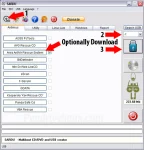
SARDU is another nice Windows based Multiboot USB Creator that can also be used to create Multiboot CD/DVD's. Created by Davide Costa, SARDU enables you to create a Multiboot UFD containing your basic essential Utilities, Antivirus, and Windows XP/7 Installers. On top of that, SARDU offers the built in ability to Defragment your USB Drive, and burn an ISO to CD/DVD.
Using UNetbootin to create a Linux USB from Linux
How to Install and Use UNetbootin from Linux: UNetbootin is a Live USB creation tool that can be used to create a Live Linux USB flash drive. One nice feature of UNetbootin is that the tool is offered for Windows and Linux. In the following, I will cover how to quickly get UNetbootin up and running within an Ubuntu Linux Operating Environment.
MultiSystem – Create a MultiBoot USB from Linux
How to Create a MultiBoot USB Flash Drive from Linux: Multisystem is an awesome tool created by LiveUSB.info, that works similar to our Windows based MultiBootISOs USB creator, but was created for use within Linux. It also uses Grub2 instead of Grub Legacy, and can be run from within Ubuntu Linux to create a Custom Multiboot UFD containing your favorite Bootable Live Linux Distributions.
Universal USB Installer – Easy as 1 2 3
Universal USB Installer is a Live Linux USB Creator that allows you to choose from a selection of Linux Distributions to put on your USB Flash Drive. The Universal USB Installer is easy to use. Simply choose a Live Linux Distribution, the ISO file, your Flash Drive and, Click Install. Other features include; Persistence (if available), and the ability to fat32 format the flash drive (recommended) to ensure a clean install. Upon completion, you should have a ready to run bootable USB Flash Drive with your select Linux version installed.
Linux Live USB Creator (LiLi) from Windows
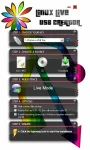
The Linux Live USB Creator is an awesome tool that can be used to install various Linux compilations, versions and distributions to a USB Flash Drive. The end result is a Bootable Live USB (in some cases with Persistence as well). Created by Thibaut Lauzière, LiLi USB Creator formerly known as uSbuntu Live Creator, can create your Linux USB Flash Drive from a source Image, ISO or CD. It can also download the IMG or ISO for you. But it doesn't stop there. LiLi USB Creator can also install a Portable Virtualbox on the USB device. You can then either boot the Linux installation from inside Windows emulated using Virtualbox on USB or Boot from USB natively (if your computer supports booting from USB).
Using UNetbootin to create a Live Linux USB
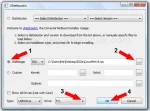
UNetbootin is a Live USB creation tool that can be used to create a Live Linux USB flash drive from an ISO. Many Linux distributions are supported out of the box with custom install options available for Linux distributions that are not. It is important to mention that Live Linux USB flash drives created with this tool, do not currently utilize a persistence feature. The resulting USB Linux install will function just as it does from a CD. By default you will not be able to save and restore your changes.
Using the Fedora USB Creator from Windows
The following tutorial will show you how to create a Fedora 9, 10, 11 + USB flash drive using Windows. Fedora is a Linux distribution that is sponsored by Red Hat and is both driven and maintained by the community. It is comprised of only free and open source software and will always remain free to use, modify and redistribute. Recently, Luke Macken and Kushal Das, both active in the Fedora community have put together an intuitive and super easy to use liveusb-creator which can be used to make a Fedora Live USB flash drive. In addition, USB Fedora utilizes a Persistent feature, enabling a user to save and restore changes on subsequent boots. In the following, we will show you how it works.
Win a Free 32GB Flash Drive