
Making a Damn Small Linux Live USB (DSL). This is a revisit of my Windows DSL bootable USB installation tutorial: "Putting Damn Small Linux on a USB". Based on the 2.4 kernel, this tiny distribution is great to use for older and slower computers as well. It will fit and run on portable devices or thumb drives as small as 64 MB.
USB Booting Damn Small Linux
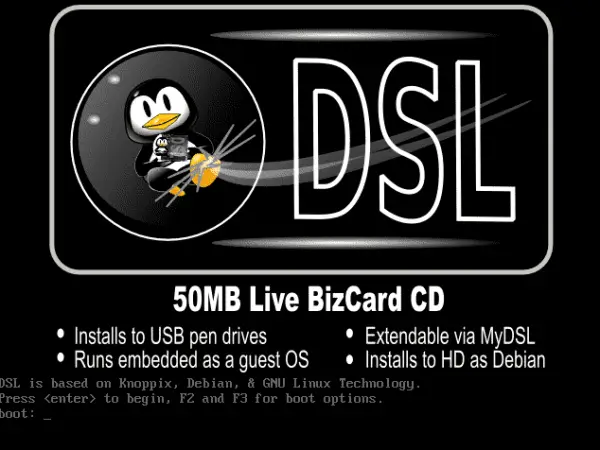
Quick Summary
- Purpose: Create a bootable Damn Small Linux (DSL) USB using YUMI.
- Best For: Reviving old PCs, lightweight rescue OS, or Linux learning.
- Requirements: DSL ISO, YUMI, USB ≥ 64MB, admin rights on a Windows PC.
What is (DSL) Damn Small Linux?
Damn Small Linux was originally created by John Andrews and is essentially a trimmed down version of an early KNOPPIX build, making it perfect for smaller drives.
DSL gained popularity for its incredibly small footprint, as the entire operating system could fit on a business card sized CD or a small USB thumb drive. Despite its tiny size, this is a very powerful feature distro that provides a fully functional desktop environment, making it suitable for older hardware or situations where resource usage needs to be kept minimal.
For example, this tiny Linux distribution includes a Fluxbox window manager and a selection of lightweight applications, such as text editors, a web browser, and a media player, all while keeping system requirements to a minimum.
Why Use Damn Small Linux?
Here are some practical reasons I can think of to still use a DSL USB today:
- Repurpose Old Hardware: Give older computers a second life by installing a lightweight and efficient operating system.
- Portable Troubleshooting Tool: Use it as a rescue OS for diagnostics, recovery, or even offline troubleshooting.
- Learn Linux: It offers a simple way to explore Linux without requiring significant resources or installation on a hard drive.
Damn Small Linux Specifications
- Distribution Home Page: Project Home Page
- Developer: Originally developed by John Andrews
- Release Date: First released in 2003
- Minimum Thumb Drive Size: 64 MB (But YUMI requires > 2 GB)
- Persistent Feature: Yes
Potential Limitations of the older DSL
While DSL is a fantastic lightweight Linux distribution, be aware of these potential challenges with the older release:
- Compatibility Issues: Limited support for modern hardware and drivers.
- Outdated Software: DSL's older technology may not work well with some contemporary file formats and applications.
- Security Concerns: The 2.4 kernel lacks modern security patches, so avoid using it for sensitive tasks.
There is a newer version you can use codenamed DSL 2024
DSL Bootable USB Drive Creation Essentials
- A Fast USB Flash Drive
- Windows Host PC (with Admin access)
- DSL 4.4.10 ISO file or the newer DSL 2024 ISO.
- YUMI (to install DSL to USB and make it bootable). Alternately use Etcher or the dd command.
How to Make a Damn Small Linux Live USB
Note: You'll have to be able to boot your PC in Legacy BIOS (Non UEFI mode). Also only the DSL 4.4.10-initrd.iso file is supported.
- Download the DSL-4.4.10-initrd.iso or the newer DSL 2024 iso file.
- Download and run the YUMI Make Bootable USB Tool.
- (1) Choose your flash drive from the dropdown. (Check the box to prepare the device. Note: this will wipe and format your USB)
(2) Select Try Unlisted ISO/IMG from the list of distributions.
(3) Browse to your ISO, and then click Create.
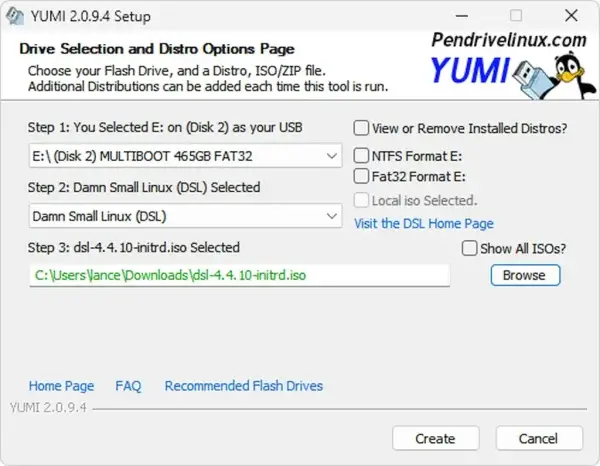
- Once the script has finished, reboot your computer and set your system BIOS or Boot Menu to boot from the USB device.
If all goes well, you should now be booting DSL from your Damn Small Linux Bootable USB. For detailed troubleshooting, refer to the DSL readme file.
Alternative Ways to Make a Damn Small Linux USB
While YUMI is the easiest and most reliable way to create a bootable Damn Small Linux USB on Windows, there are a couple of other proven methods you can try. These alternatives may be useful if you are working from Linux or macOS.
Method 2: Create a DSL USB Using the dd Command (Linux)
The dd method is a traditional and highly reliable way to write a Linux ISO directly to a USB drive. This approach is recommended for experienced users running Linux, as selecting the wrong device can overwrite important data.
- Best For: Linux users and advanced users
- Requirements: Linux system, DSL ISO, root or sudo access
- Insert your USB flash drive.
- Identify the device name using:
lsblk - Unmount the USB drive if it is mounted.
- Run the following command, replacing
sdXwith your actual device:sudo dd if=dsl-4.4.10-initrd.iso of=/dev/sdX bs=4M status=progress - Wait for the process to complete, then safely eject the USB drive.
Once finished, reboot your system and select the USB device from the BIOS or Boot Menu to launch Damn Small Linux.
Method 3: Create a DSL USB Using balenaEtcher (Cross Platform)
balenaEtcher is a modern, beginner friendly USB imaging tool that works on Windows, Linux, and macOS. While DSL is quite old, Etcher can still successfully write the DSL ISO to a USB drive on many systems.
- Best For: Beginners or non Linux users
- Requirements: balenaEtcher, DSL ISO, USB flash drive
- Download and install balenaEtcher.
- Launch Etcher and select the
dsl-4.4.10-initrd.isofile. - Select your USB flash drive.
- Click Flash and wait for the process to complete.
After flashing, reboot your PC and attempt to boot from the USB device using Legacy BIOS mode.
Which Method Should You Use?
- YUMI: Best overall choice for Windows users and multi boot USB setups.
- dd Command: Most reliable low level method for Linux users.
- balenaEtcher: Easiest cross platform option, though success may vary on very old ISOs.
Tips for USB DSL Success
- BIOS Settings: Ensure USB boot is enabled in your system's BIOS or Boot Menu settings.
- Format Drive: Use the prepare this drive option to format the USB drive before creating the bootable media.
- Set Up Persistence: Explore persistence features to save system changes and customizations across sessions.
Looking for Alternatives?
If DSL doesn't meet your needs, you might consider trying another popular tiny Linux distro alternative like USB SLAX, or Puppy Linux. Both of these alternate lightweight Linux distributions offer better modern hardware support and have active helpful communities.
Here's a comparison chart outlining the differences between these lightweight Linux Distributions:
| Feature | Damn Small Linux (DSL) | SLAX | Puppy Linux |
|---|---|---|---|
| Initial Release | 2003 | 2003 | 2005 |
| Base System | Knoppix (Debian-based) | Slackware-based | Independent with Ubuntu/Debian compatibility |
| Footprint | 50MB | < 300MB | ~300MB |
| Default Window Manager | Fluxbox | KDE/Fluxbox | JWM or Openbox |
| Hardware Support | Older, resource limited hardware | Broad, including modern hardware | Broad, including both old and new systems |
| Persistent Feature | Yes | Yes | Yes |
| Community Support | Limited (development has slowed) | Active and modern | Active and modern |
| Use Case | Extremely small footprint for older PCs | Portable modular OS for versatile use | General purpose lightweight OS |
Frequently Asked Questions (FAQ) - Damn Small Linux USB
Can I use Damn Small Linux on modern hardware?
Damn Small Linux was designed for older systems and may lack drivers for newer hardware. It's best used on legacy machines or virtual machines. For modern hardware, consider Puppy Linux or SLAX.
Can I save files or changes with DSL on USB?
Yes, DSL supports a persistent storage feature. You can set up a separate partition on your USB drive to store user data and system changes across reboots.
Do I need a special USB format or partition type?
Most tools like YUMI will automatically format your USB drive to FAT32, which is compatible with DSL. It's recommended to let the USB creation tool handle formatting unless you're customizing partitions.
Is DSL still being actively developed?
DSL development has slowed down significantly. While it's still available for download and use, security and software updates are limited. Use it primarily for learning or specific retro computing needs.
How do I access the internet in DSL?
DSL includes basic network support. You can connect via Ethernet, and in some cases, Wi-Fi with older compatible chipsets. You'll need to use the built-in tools like pppoeconf or the DSL Control Panel for setup.
What's the default login or root password in DSL?
Typically, the default user is dsl with no password. For root access, the user is root and the password is dsl. Always check the readme or forum for specific version info.
Can I run DSL in a virtual machine instead of USB?
Absolutely. Damn Small Linux is very lightweight and works great in virtual machines like VirtualBox or VMware. Just mount the ISO and boot it as a live session.
How do I troubleshoot USB booting problems?
- Ensure your BIOS supports USB boot and it's enabled.
- Try different USB ports or reformat the drive.
- Double check the ISO file integrity before writing.
- Use tools like Rufus or YUMI if one fails to boot.
Is DSL secure enough for daily use?
Because DSL is based on an older 2.4 Linux kernel, it lacks modern security updates. Avoid using it for online banking, file syncing, or any task requiring sensitive data. It's better suited for experimentation or recovery tasks.
Final Take on running Damn Small Linux from USB
In my opinion, Damn Small Linux is a remarkable lightweight Linux distribution that has stood the test of time. Whether you're reviving old hardware, just exploring Linux, or simply looking for a tiny OS, running DSL Live from a bootable USB can be an excellent choice. Just remember to consider its limitations in the modern world of computing.
