
Accessing Linux Files from Windows (Linux to Windows File Sharing): How do I read Linux files from Windows or access files from Linux on Windows? This comprehensive guide explains multiple proven methods for accessing Linux filesystems from Windows, including both legacy direct filesystem tools and modern Windows native solutions. Whether you are dual booting, using a Linux formatted USB drive, recovering data, or sharing files across systems, this article shows how to safely and effectively access Linux Ext2, Ext3, and Ext4 partitions on Windows.
Looking to Access Linux Files From Windows?
This guide includes both classic direct filesystem access utilities and modern Windows integrated methods. Older tools such as Explore2fs, Ext2 IFS, and Ext2Fsd are documented in full for compatibility, recovery, and bootable USB use cases. Newer approaches like Windows Subsystem for Linux (WSL), network based sharing with Samba, and secure file transfer via SSH are included for safer daily access and workflows.
Why Access Linux Files from Windows?
Accessing Linux files from Windows is useful when you have data stored on your Linux system that you need to view, copy, or modify from within Windows. Common scenarios include dual boot systems, Linux formatted USB flash drives, external hard drives, shared documents, multimedia files, or recovering data from a lost Linux installation.
Methods: How to Read Linux Files on Windows
There are several ways to access Linux files from Windows, each offering different levels of access, safety, and convenience. Some methods mount Linux filesystems directly within Windows, while others rely on network sharing, subsystem integration, or secure transfer protocols. Choose a method based on your needs for read only access, full read/write access, or long term integration.
Direct Linux Filesystem Access on Windows (Legacy)
The following direct filesystem tools allow Windows to access Linux filesystems such as Ext2, Ext3, and Ext4. These are particularly useful for USB flash drives, external disks, dual boot partitions, and data recovery situations. Write enabled drivers should be used with caution to avoid filesystem corruption.
Explore2fs (Read Only Access)
Explore2fs is a free graphical utility that allows Windows users to access Linux Ext2 and Ext3 partitions through a familiar explorer style interface. It provides read only access, making it a safe option for copying files from Linux to Windows without modifying the Linux filesystem.
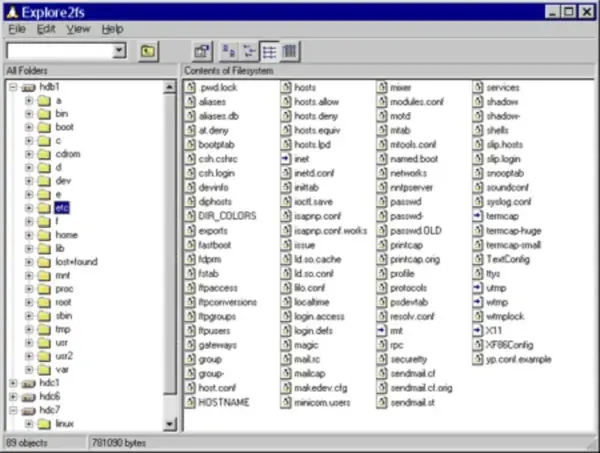
Project Home Page: Explore2fs
Installing Explore2fs
- Download Explore2fs from the official website.
- Install the application on your Windows system.
- Reboot your computer to ensure the filesystem driver loads properly.
Once installed, you can browse supported Linux partitions and copy files into Windows.
Ext2 IFS (Read and Write Access)
Ext2 IFS is an installable filesystem driver that enables Windows to mount Linux Ext2 and Ext3 partitions with read and write access. Linux volumes appear directly in Windows Explorer, allowing seamless file transfers and modifications.
Ext2 IFS Home Page: Ext2 IFS
Warning: Enabling write access to Linux partitions from Windows increases the risk of filesystem corruption if Windows does not shut down cleanly. Always back up important data before enabling write support.
Installing Ext2 IFS
- Download Ext2 IFS from the official site.
- Install the driver on your Windows PC.
- Reboot to activate filesystem support.
Ext2Fsd (Full Linux Filesystem Access)
Ext2Fsd is an open source filesystem driver that allows Windows to read and write Ext2, Ext3, and Ext4 partitions. It includes a volume manager and additional tools such as mke2fs for creating Linux formatted partitions from Windows.
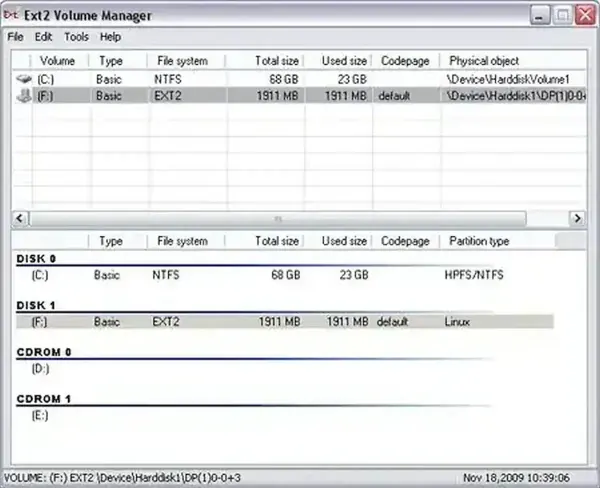

The image above shows Windows Explorer displaying the contents of a Linux formatted USB drive using Ext2Fsd. Files stored on the Linux filesystem become accessible directly from Windows.
Warning: Although Ext2Fsd supports write access, it should be used with caution. Improper shutdowns, driver instability, or unclean mounts may result in data loss. Backups are strongly recommended.
Installing Ext2Fsd
- Download Ext2Fsd from SourceForge.
- Install and configure read or read write access.
- Reboot your system.
After installation, Linux partitions should appear in Windows Explorer and be accessible based on the permissions you selected.
DiskInternals Linux Reader (Read Only Access)
DiskInternals Linux Reader provides a safe, read only way to access Linux filesystems including Ext2, Ext3, Ext4, and ReiserFS. Files can be previewed and exported to Windows compatible locations without mounting the filesystem directly in Explorer.
Features
- Read only access prevents accidental corruption.
- Supports file previews for commonly used formats.
- Exports files directly to Windows drives.
Installing DiskInternals Linux Reader
- Download DiskInternals Linux Reader.
- Install the software on Windows.
- Launch and browse Linux partitions safely.
Modern and Safer Methods for Linux File Access
WSL (Windows Subsystem for Linux)
Windows Subsystem for Linux allows you to run a Linux environment directly within Windows. With WSL 2, file access is handled using a real Linux kernel, making it one of the safest ways to work with Linux files on Windows.
Using WSL for File Access
- Open PowerShell as Administrator and run:
wsl --install
- Install a Linux distribution from the Microsoft Store (such as Ubuntu).
- Access Linux files from Windows Explorer using:
\\wsl$\
or navigate within a WSL distro.
WSL is ideal for modern Windows systems and integrated workflows. It works best for Linux environments running inside WSL or when combined with network sharing. Recent versions also support mounting raw ext4 partitions using WSL mount.
Network Based Linux to Windows File Sharing
Samba (SMB File Sharing)
Samba allows Linux systems to share folders over a local network so they appear as standard network drives in Windows Explorer. This method does not mount Linux filesystems directly in Windows, making it one of the safest and most reliable ways to access Linux files from Windows for daily use.
How to Share a Folder from Linux to Windows Using Samba
Step 1: Install Samba on Linux
Open a terminal on your Linux system and install Samba:
sudo apt update
sudo apt install samba
On Fedora or RHEL based systems:
sudo dnf install sambaStep 2: Create or Choose a Shared Folder
Choose an existing folder or create a new one to share. For example:
mkdir ~/sharedStep 3: Configure Samba Share
Edit the Samba configuration file:
sudo nano /etc/samba/smb.confAdd the following to the bottom of the file:
[Shared]
path = /home/username/shared
browseable = yes
read only = no
guest ok = yes
Replace username with your Linux username.
Step 4: Restart Samba
sudo systemctl restart smbdStep 5: Access the Share from Windows
On Windows, open File Explorer and enter the following in the address bar:
\\linux-ip-address\SharedYou can find your Linux IP address by running:
ip aOnce connected, the shared folder behaves like a normal Windows network drive.
Tip: For permanent access, right click the share in File Explorer and choose Map Network Drive.
If a firewall is enabled, allow Samba traffic:
sudo ufw allow sambaSFTP and SSH
Secure file transfer tools such as WinSCP or FileZilla allow Windows users to access Linux files over SSH without mounting filesystems directly. This is especially useful for remote or headless systems.
Best Way to Access Linux Files from Windows (Quick Comparison)
| Method | Read | Write | Best Use Case |
|---|---|---|---|
| Explore2fs | Yes | No | Quick recovery, older systems |
| Ext2 IFS | Yes | Yes | Dual boot with write needs |
| Ext2Fsd | Yes | Yes | USB drives, advanced users |
| DiskInternals Linux Reader | Yes | No | Safe file browsing |
| WSL | Yes | Yes (within distro) | Modern workflows |
| Samba or SFTP | Yes | Yes | Network sharing |
What Not to Do When Accessing Linux Files from Windows
- Do not enable write access unless absolutely necessary.
- Do not hibernate or force shutdown Windows while Linux partitions are mounted.
- Always eject USB drives properly before removal.
- Back up important Linux data before using drivers with write support.
Final Thoughts on Linux File Sharing
Accessing Linux files from Windows is easier than ever thanks to a wide range of available tools. For occasional access or data recovery, read only utilities like DiskInternals Linux Reader provide the safest option. For daily workflows, modern approaches like Samba, SSH, or Windows Subsystem for Linux (WSL) offer greater stability and flexibility. Legacy direct filesystem drivers remain valuable for specific scenarios but should be used with backups and caution in place.