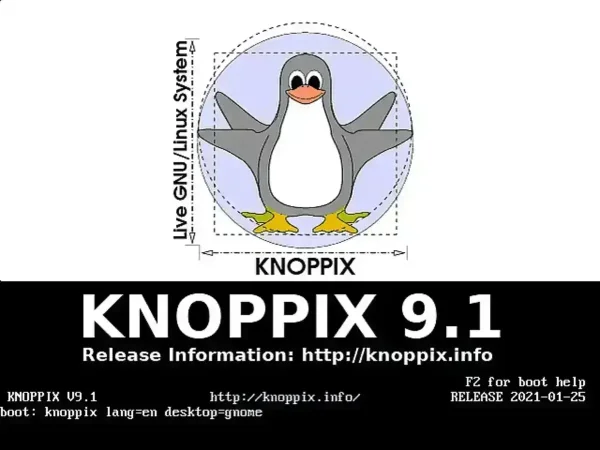
KNOPPIX Boot Options or Cheat Codes: Here is a comprehensive list of available KNOPPIX boot command options. These cheat codes, also referred to as KNOPPIX boot parameters or KNOPPIX startup options, enable you to modify the boot process. They are indispensable for troubleshooting, optimizing, and Live Booting KNOPPIX on even the most challenging hardware setups.
What Are KNOPPIX Boot Options?
Boot options in KNOPPIX let users customize the startup process by passing specific instructions to the kernel. These instructions allow you to control hardware detection, tweak system behavior, and even activate or bypass specific components of the operating system. This flexibility is especially valuable when using a KNOPPIX Live USB to boot systems with unique requirements or compatibility issues.
How KNOPPIX Cheat Codes Work
When you enter cheat codes at the boot prompt, the kernel uses these parameters to adjust modules, initialization routines, and detection processes. For instance, disabling ACPI (acpi=off) prevents the kernel from querying the Advanced Configuration and Power Interface (ACPI) table provided by the BIOS, which can be crucial for problematic hardware or BIOS configurations.
Why Use KNOPPIX Cheat Codes?
KNOPPIX cheat codes are designed to make the system as versatile as possible. Whether you're setting up KNOPPIX on an older computer, debugging boot errors, or configuring a system for specific use cases, cheat codes provide the tools you need. Here's why they are so useful:
- Hardware-Specific Adjustments: Address and overcome issues with particular hardware setups, such as problems with graphics cards, network interfaces, or non-standard BIOS configurations. For example, if your USB ports aren't working,
knoppix nousbmight be the solution. - Resource Optimization: Use codes like
knoppix 2(text mode) to reduce system resource usage, making KNOPPIX more suitable for older machines or low-spec environments. - Debugging & Troubleshooting: Enable debugging features using
debugorknoppix init=/bin/bashto investigate issues or resolve startup problems by bypassing certain system processes. - Security & Privacy: Certain cheat codes allow you to boot the system in a way that is more secure, disabling unnecessary services and preventing certain components from loading.
KNOPPIX Boot Codes and Their Purpose
KNOPPIX Cheat Codes Example: knoppix lang=en desktop=gnome
Any of the KNOPPIX boot options, cheat codes, or kernel boot command parameters from the following list can be combined and used at the boot prompt to optimize your system's behavior:
| Knoppix Boot Option | Boot Option Function |
|---|---|
knoppix lang=ch|cn|de|da|es|fr|it|nl|pl|ru|sk|tr|tw|us |
Specify language |
knoppix keyboard=us xkeyboard=us |
Specify keyboard |
adriane |
Start blind-friendly, talking desktop |
debug |
Debug boot process step-by-step |
expert |
Interactive setup for experts |
knoppix |
Knoppix with 32-bit Kernel |
knoppix64 |
Knoppix with 64-bit Kernel |
knoppix 2 |
Runlevel 2, Text mode only |
knoppix init=/bin/bash |
Start bash as process 1 instead of init |
knoppix utc |
Use Universal Time |
knoppix tz=Europe/Berlin |
Set timezone (default: tz=localtime) |
knoppix ide1=reset |
Try if Knoppix can't find CD/DVD drive on old computers |
knoppix no{apic, lapic, acpi, apm} |
Skip parts of hardware detection (1) |
knoppix no{hwsetup, udev, dhcp, fstab} |
Skip parts of hardware detection (2) |
knoppix no{pcmcia, sound, swap} |
Skip parts of hardware detection (3) |
knoppix nousb |
Skip USB hardware detection |
knoppix nolapic |
Disable local APIC (differs from noapic) |
knoppix noideraid |
Disable IDE RAID disk detection |
knoppix pnpbios=off |
Disable PnP BIOS initialization |
knoppix acpi=off |
Disable ACPI BIOS completely |
failsafe |
Boot with minimal hardware detection |
knoppix pci=irqmask=0x0e98 |
Try if PS/2 mouse doesn't work |
KNOPPIX Cheat Code Use Cases
Using KNOPPIX cheat codes, you can address a range of scenarios:
- Hardware-Specific Adjustments: For systems with non-standard hardware, codes like
knoppix nolapicorknoppix nousbhelp bypass unsupported configurations. - Low-Resource Environments: Running KNOPPIX on older systems? Booting into text mode (
knoppix 2) eliminates the need for graphical resources, significantly reducing startup requirements. - Debugging Boot Issues: Codes like
debugorknoppix init=/bin/bashare invaluable for isolating and resolving initialization problems. - Accessibility: Activate the
adrianecode for a talking desktop environment designed for visually impaired users.
More KNOPPIX Boot Code Examples
Here are more examples of KNOPPIX cheat codes in action, demonstrating various configurations for specific needs:
knoppix lang=fr desktop=kde, Boots the system in French and sets the KDE desktop environment.knoppix nomodeset, Disables video mode setting, which can be useful if you're encountering display issues or graphical glitches during boot.knoppix toram, Loads KNOPPIX entirely into RAM, allowing you to remove the USB or CD/DVD media after boot. Ideal for running KNOPPIX entirely from RAM on systems with sufficient memory.knoppix screen=1280x1024, Forces the screen resolution to 1280x1024, ensuring the display matches your monitor's capabilities.knoppix noapic nolapic, Disables both APIC (Advanced Programmable Interrupt Controller) and LAPIC (Local APIC), which can resolve issues with certain hardware setups, particularly with older or non-standard systems.knoppix nodma, Disables DMA (Direct Memory Access) for storage devices, which can help resolve issues with certain hard drives or CD/DVD drives.knoppix acpi=off noacpi, Completely disables ACPI (Advanced Configuration and Power Interface), which is helpful when dealing with power management issues or compatibility with specific hardware.knoppix mem=1024M, Limits the system to use only 1GB of RAM, which can be helpful for testing memory configurations or running KNOPPIX on systems with limited RAM.knoppix vga=791, Sets a specific video mode. In this case, "791" is the code for a 1024x768 resolution at 16-bit color depth. Useful when graphical problems occur with default settings.knoppix nofirewire, Disables FireWire (IEEE 1394) support, useful for troubleshooting systems with incompatible FireWire hardware.knoppix nox, Starts KNOPPIX without the X Window System, essentially booting the system into text-only mode without a graphical interface.knoppix dma=off, Disables Direct Memory Access for storage devices, which can be helpful in troubleshooting issues with drives that do not work properly under DMA.knoppix maxcpus=1, Limits KNOPPIX to use only one CPU core, which can help stabilize systems with multi-core processors that may experience issues during boot.These additional examples demonstrate the flexibility of KNOPPIX boot codes. By combining various parameters, users can create tailored boot environments that are optimized for their specific hardware and troubleshooting needs.
Combining KNOPPIX Cheat Codes
KNOPPIX boot parameters can be combined to address multiple needs simultaneously. For instance:
knoppix lang=de xkeyboard=de screen=1024x768, Boots the system in German, sets the keyboard layout to German, and forces a 1024x768 screen resolution.knoppix failsafe debug acpi=off, Starts with minimal detection, activates debug mode, and disables ACPI for problematic BIOS settings.The ability to stack options provides users with granular control, making KNOPPIX a highly adaptable tool for diverse scenarios.
Tips for Using KNOPPIX Boot Commands
- Experiment and Document: Not all commands will apply universally. Testing various combinations on different hardware can reveal the best setup for your environment.
- Consult Official Documentation: For more details on less common parameters, the KNOPPIX wiki is a valuable resource.
- Use Persistent Storage: When using KNOPPIX as a Live USB, persistent storage allows you to retain custom configurations between sessions, including boot cheat codes.
The Power of Customization
By experimenting with KNOPPIX cheat codes, you can unlock the full potential of the operating system across a wide variety of hardware setups. Whether you're working on a rescue mission for an old PC, configuring an environment for system testing, or simply optimizing performance, these boot options give you the flexibility to fine-tune your experience.
Don't hesitate to try different combinations of boot parameters, as computer system hardware configurations vary widely. With patience and the right codes, KNOPPIX can run from a Live bootable USB on almost any system!