
How to Create a PCLinuxOS Bootable USB Drive: PCLinuxOS is a clean, compact, and visually polished Live Linux distribution developed by Texstar. Originally derived from Mandriva Linux, it has since evolved into a fully independent operating system known for its rolling release model, excellent hardware compatibility, and user friendly desktop experience. This Live Linux OS is an excellent choice for creating a portable operating system that can run directly from a USB flash drive on almost any compatible computer.
Make a PCLinuxOS Bootable USB Drive
PCLinuxOS MiniMe Running from USB
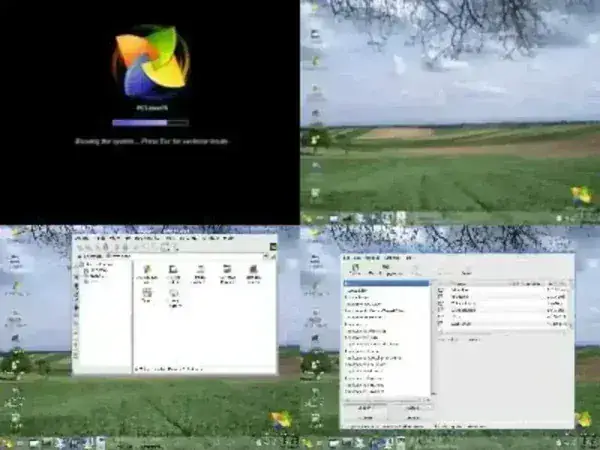
Shown above is the classic MiniMe edition, a lightweight and minimal version of PCLinuxOS designed for speed and simplicity. While this particular release is older, MiniMe remains popular among users who prefer a barebones system that can be customized from the ground up. For the newest releases, desktop editions, and official updates, visit the PCLinuxOS project website.
The History and Highlights of PCLinuxOS
PCLinuxOS was founded in 2003 by Texstar and began as a fork of Mandriva Linux. Over time, it transitioned into a fully independent distribution with a strong focus on stability, usability, and up to date software. One of its defining characteristics is its rolling release model, which allows users to continuously receive updates without the need to reinstall the operating system.
Another standout feature is its use of the Synaptic Package Manager, which provides a powerful yet easy way to install, update, and remove software. Combined with well curated repositories, this makes system maintenance straightforward even for newcomers. PCLinuxOS is best known for its KDE Plasma desktop, but it also offers lighter editions such as XFCE and the minimal MiniMe for older or lower powered hardware.
What Sets PCLinuxOS Apart?
Here are some of the key features that distinguish PCLinuxOS from other Live Linux distributions:
- Rolling Release Model: Stay current with system updates without reinstalling or upgrading between major versions.
- Synaptic Package Manager: A reliable graphical tool that simplifies software management for all experience levels.
- Multiple Desktop Editions: Choose from KDE Plasma, XFCE, MATE, or minimal MiniMe depending on your performance needs.
- Excellent Hardware Detection: Known for working out of the box on a wide range of systems.
- Active Community: Helpful forums and documentation for troubleshooting and customization.
Why Run PCLinuxOS from a USB Drive?
Running PCLinuxOS from a bootable USB offers several practical advantages:
- Portability: Carry your operating system, tools, and files with you.
- No installation required: Test or use Linux without modifying your internal hard drive.
- Faster than optical media: USB drives provide significantly better performance than CDs or DVDs.
- Ideal for recovery and diagnostics: Useful for troubleshooting, system repairs, or secure computing on shared machines.
Essentials for Creating a PCLinuxOS Bootable USB
Before getting started, make sure you have the following:
- A fast USB flash drive (8 GB or larger recommended).
- The latest
pclinuxos*.isofile from the official website. - A Windows 8, 10, or 11 system, or Linux using WINE.
- The YUMI Multiboot USB Creator tool.
Steps to Create a USB Bootable PCLinuxOS
Follow these steps to create your bootable USB using YUMI:
- Download and install YUMI on your computer.
- Launch YUMI and complete the following:
- Select your USB drive from the dropdown list.
- Choose PCLinuxOS from the distribution menu.
- Browse to and select your
pclinuxos*.isofile. - Click Create to begin writing the ISO to the USB drive.
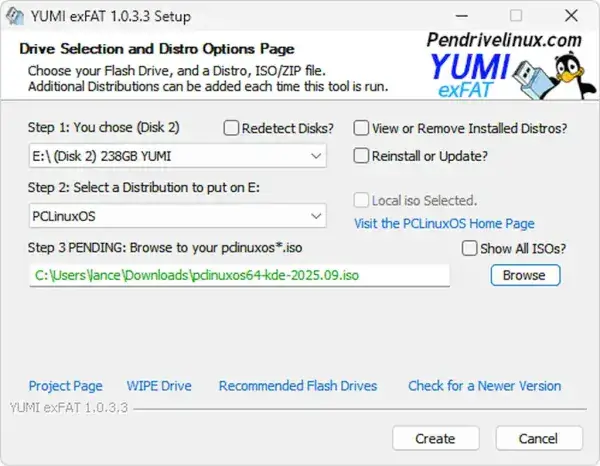
- Once completed, safely eject the USB drive.
- Access your BIOS or boot menu and set the USB device as the primary boot option.
- Save changes and reboot to launch PCLinuxOS from USB.
Default Login Credentials
Use the following credentials when prompted:
- Root: Username
root, Passwordroot - Guest: Username
guest, Passwordguest
Advanced Troubleshooting for USB Boot Issues
USB Drive Not Detected
- Ensure the system supports USB booting and that it is enabled in BIOS.
- Try another USB port, preferably USB 2.0 on older systems.
- Recreate the USB using a different tool such as Universal USB Installer.
System Freezes During Boot
- Verify the ISO checksum to ensure the download is not corrupted.
- Disable Secure Boot if enabled.
- Try writing the ISO using Etcher for a direct image write.
Slow Boot Performance
- Use a high speed USB 3.0 flash drive or SSD based USB.
- Connect the drive to a USB 3.x port when available.
USB Missing from Boot Menu
- Use common boot menu keys such as
F12,F2, orDel. - Enable Legacy Boot if UEFI does not detect the device.
Frequently Asked Questions
Can I install PCLinuxOS directly from the USB?
Yes. Once booted into the live environment, you can launch the installer and install PCLinuxOS directly to an internal hard drive or SSD.
Is YUMI required?
No. Tools such as Etcher and Rufus can also be used to create a bootable PCLinuxOS USB drive.
Will running from USB affect my hard drive?
No. Live mode runs entirely from system memory and the USB drive unless you explicitly choose to install the operating system to a hard drive.
Can I save changes while running from USB?
Persistence may be available depending on the method used to create the USB. However, PCLinuxOS is generally best suited for live usage or a full installation rather than long term persistent USB use.
What are the minimum hardware requirements?
- KDE Plasma: 2 GB RAM, dual core CPU, 20 GB of storage.
- MiniMe: As little as 512 MB RAM for basic usage.
Final Thoughts
Creating a PCLinuxOS bootable USB is an excellent way to experience a polished, rolling release Linux distribution without committing to installation. Whether you are testing hardware compatibility, performing system recovery, or carrying a portable Linux environment, PCLinux OS delivers stability, performance, and flexibility. With YUMI and a fast USB drive, you can be up and running in minutes. For additional utilities and guides, explore our USB Tools section.
