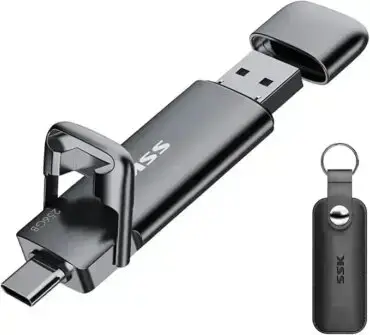
How to Boot Ubuntu to RAM (Ubuntu toram) from a Live USB: In this tutorial, you'll learn how to use the toram boot parameter to copy the live system's read-only media into RAM during startup. When the copy completes and the live environment no longer depends on the USB device, you can usually remove the drive. This requires enough available memory for the media and running system, and behavior can vary by Ubuntu release and persistence setup. Running from RAM can reduce USB access after startup and free the port for another device.
Although commonly associated with Ubuntu Desktop, the toram option is also supported by many official Ubuntu flavors that use the same live boot infrastructure, including Kubuntu, Xubuntu, Lubuntu, Ubuntu MATE, Ubuntu Budgie, Ubuntu Studio, and others. Support ultimately depends on the specific release and live boot system being used.
What Does the Ubuntu toram Boot Parameter Do?
The toram boot parameter tells a compatible live boot system to copy the read-only live media into RAM before mounting the root filesystem. This can let you remove the USB drive after startup, but only once the copy has completed and the running session no longer depends on the device. Exact behavior varies by release and persistence configuration.
Running a live Linux system from RAM offers several advantages:
- Faster access to operating system files after booting.
- Reduced read activity on the USB flash drive.
- The option to remove the USB drive after startup, if the live system has fully copied its read-only media into RAM and no longer depends on the device.
- Improved portability when using a single USB drive across multiple computers.
- A quieter experience on systems with slower USB storage devices.
Supported Ubuntu Versions and Flavors
The toram option is available on many Ubuntu Live releases and official Ubuntu flavors that use the same live boot infrastructure.
Commonly supported distributions include:
- Ubuntu Desktop
- Kubuntu
- Xubuntu
- Lubuntu
- Ubuntu MATE
- Ubuntu Budgie
- Ubuntu Studio
- Edubuntu
Some community distributions based on Ubuntu may also support toram, while others use different live boot systems or boot parameters. Support ultimately depends on the distribution and release version.
Requirements for Running Ubuntu from RAM
Before using toram, you'll need:
- A bootable Ubuntu Live USB: Created from an Ubuntu ISO image.
- Sufficient system memory: The computer must have enough available RAM to hold both the compressed live image and the running operating system.
- A compatible Ubuntu release: Most modern Ubuntu Live releases support
toram, though availability varies by version.
As a general guideline, systems with 8 GB or more of RAM provide the best experience. Lightweight flavors such as Lubuntu or Xubuntu may run comfortably with less memory, while larger desktop environments may require additional RAM depending on the size of the live image and the applications you intend to use.
How to Boot Ubuntu to RAM
- Boot from your Ubuntu Live USB.
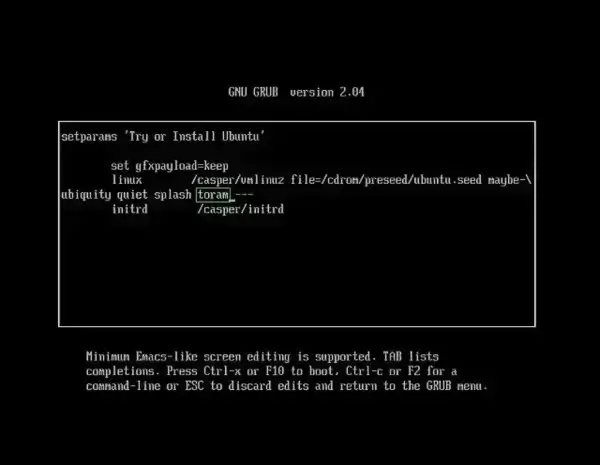
- Edit the boot entry.When the boot menu appears, press E if you're using a GRUB-based menu. Older Ubuntu releases using ISOLINUX or SYSLINUX may instead use Tab or F6 to edit the boot parameters.
- Add the toram parameter.Locate the Linux kernel command line containing
quiet splash(or similar) and append:toram
A typical entry may resemble:
linux /casper/vmlinuz boot=casper quiet splash toram
- Continue booting.Press F10, Ctrl+X, or the key indicated on screen to continue booting. Ubuntu will begin copying the live operating system into RAM before loading the desktop.
- Remove the USB drive.Once Ubuntu has completely loaded and reached the desktop, the USB drive can typically be removed because the operating system is now running directly from memory.
Things to Know Before Using toram
- RAM Requirements: The live operating system must completely fit into available memory. If insufficient RAM is available, Ubuntu may fail to boot or become unstable.
- Longer Startup: Initial boot time is usually longer because Ubuntu first copies the live environment into RAM before launching the desktop.
- Persistence: Compatibility between
toramand persistent storage varies by Ubuntu release and live boot implementation. Some versions support both features together, while others may ignore persistence or require additional configuration. - Software Installation: Unless persistent storage is enabled, any software installed during the live session will be lost after shutdown.
Advantages of Running Ubuntu from RAM
Booting Ubuntu entirely into RAM is especially useful when:
- Troubleshooting computers using a live Linux environment.
- Testing Ubuntu without accessing the USB drive after startup.
- Reducing wear on flash storage devices.
- Freeing the USB port for another device.
- Running Ubuntu on systems with slower USB interfaces.
- Demonstrating Ubuntu on multiple computers using a single flash drive.
Troubleshooting Ubuntu toram
- Ubuntu won't boot: Verify that your system has enough available RAM for the selected Ubuntu edition.
- The USB drive cannot be removed: Some Ubuntu releases or persistence configurations may continue accessing the boot media.
- toram appears to do nothing: Confirm that your Ubuntu release supports the
toramboot parameter. Some Linux distributions use different live boot systems or alternative parameters. - The system runs out of memory: Try using a lighter Ubuntu flavor such as Lubuntu or Xubuntu, or add additional RAM.
Frequently Asked Questions
How do I boot Ubuntu into RAM?
Edit the Ubuntu boot parameters before startup and append the toram option to the Linux kernel command line. Ubuntu will copy the live operating system into memory during boot.
Can I remove the USB drive after Ubuntu boots?
Usually, yes—but wait until Ubuntu has fully loaded and the toram copy has completed. The option copies the live system's read-only media into RAM; if your release or persistence configuration still accesses the USB, removing it may cause errors. If unsure, leave the drive connected.
How much RAM do I need?
Requirements depend on the Ubuntu edition you're using. While some lightweight flavors may work with 4 GB of RAM, 8 GB or more generally provides a much smoother experience.
Does toram work with Kubuntu, Xubuntu, and Lubuntu?
Many official Ubuntu flavors including Kubuntu, Xubuntu, Lubuntu, Ubuntu MATE, Ubuntu Budgie, and Ubuntu Studio support the toram option because they use the same live boot infrastructure. Support can vary between releases.
Can I use persistence together with toram?
Sometimes. Support depends on the Ubuntu release and live boot implementation. Some versions allow both features to work together, while others do not.
Does booting Ubuntu into RAM improve performance?
After startup completes, many operations feel more responsive because system files are being accessed directly in Ubuntu from RAM instead of the USB storage device.
Final Thoughts
Booting Ubuntu into RAM using the toram boot parameter is one of the simplest ways to improve the flexibility of a Live USB session. After the operating system finishes loading, it runs independently from the USB drive, allowing the boot media to be removed while Ubuntu continues operating entirely from memory.
Whether you're troubleshooting a PC, evaluating Ubuntu, reducing wear on a flash drive, or simply freeing a USB port, the Ubuntu boot to ram option remains one of the most useful features available in many Ubuntu Live environments. If your Ubuntu release or favorite flavor supports it, it's well worth taking advantage of.