
virtual machine

How to Install WINE on Ubuntu: Run Windows Apps on Linux

Install Wine on Ubuntu

How to Install WINE on Ubuntu and Run Windows Apps on Linux. Have you ever needed to run a Windows program on your Linux machine? WINE is a powerful compatibility layer that enables Linux users to run Windows executable (.exe) files natively on Linux. By bridging the gap between Windows and Linux, WINE makes it possible to use essential Windows software, tools, and even many games directly from your Linux desktop.

This guide shows in simple steps how to install and configure WINE on Ubuntu, so you can run your favorite Windows applications efficiently and with minimal setup.
How to Run ISO from Windows without Rebooting

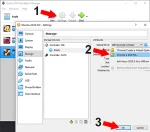
Virtualbox choose ISO file

How to Easily Run ISO from Windows Without Rebooting: Running an ISO from Windows allows you to operate a separate operating system or bootable tool without restarting your computer. This guide covers how to use VirtualBox, VMware, Hyper-V, or QEMU to run a bootable ISO from a USB flash drive or local storage, all while continuing to work within an up and running Windows environment. This method is perfect for those who want to have both operating systems running simultaneously, eliminating the need to adjust BIOS or UEFI settings.