
The following is a quick reference list of some useful Linux shell commands along with a short description of common usage. There are several more, but this basic list was created to help familiarize the newly introduced Ubuntu users. Those who might be migrating from a Windows operating environment.
Linux Shell Commands - Quick Reference Guide
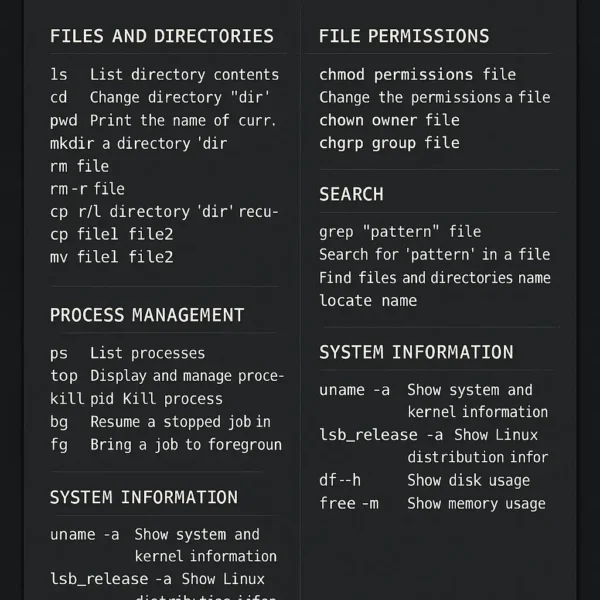
Linux Shell Commands Quick Reference Guide
Example Linux Shell Commands
cd - change to a new directory.
cd <directory name>clear - clear the screen.
clearcp - copy files or directories.
cp file1 file2 cp -r source_directory/ target_directory/diff - compare files for differences.
diff file1 file2exit - exit or quit the terminal.
exitfind - find files by name.
find -name <filename>fsck - check disk integrity.
fsckifconfig - view network settings (replaced by ip on newer distros).
ifconfigless - view text files.
less <filename>lpr - print text files.
lpr <filename>man - get help for a provided command.
man <command>mkdir - create a directory.
mkdir <directory name>mv - move or rename files.
mv file1 file2ping - check a network connection.
ping example.comrm - remove files or directories.
rm file rm -r directorytracepath - trace the path to a network host.
tracepath example.comvi - edit files using the vi editor.
vi <filename>Additional Linux Commands
Process Management
ps - list current processes.
pstop - view real-time process activity.
topkill - terminate a process by PID.
kill <pid>bg - resume a job in the background.
bgfg - bring a job to the foreground.
fgFile Permissions
chmod - change file permissions.
chmod 755 filechown - change file owner.
chown user filechgrp - change group ownership.
chgrp group fileSearch
grep - search for a pattern within a file.
grep "pattern" filenamelocate - quickly find file paths (requires updatedb to be run).
locate filenameSystem Information
uname -a - display system and kernel info.
uname -alsb_release -a - show Linux distribution details.
lsb_release -adf -h - show disk usage in human-readable format.
df -hfree -m - display memory usage in MB.
free -mFinal Thoughts on Linux Shell Commands
Learning to navigate the Linux shell can feel intimidating at first, especially if you're coming from a graphical Windows environment. But with just a handful of essential commands, you can begin to unlock the real power of the Linux operating system.
This guide covers only the basics, but it's enough to get you started managing files, checking system resources, monitoring processes, and more, all from the command line. As you grow more comfortable, consider exploring tools like cron (for scheduling tasks), rsync (for syncing files), and advanced scripting with bash.
Don't be afraid to use the man command whenever you're unsure how something works. The manual is built into nearly every Linux system and is one of the best resources available.
Pro tip: Practice makes permanent. The more often you use these commands, the more second-nature they'll become.
Happy terminal-ing! 🐧